Participant
August 12, 2017
Answered

Transform Increment Arrows/Buttons Missing...?

  • August 12, 2017
  • 3 replies
  • 876 views

I can't seem to find any discussions relating to this...

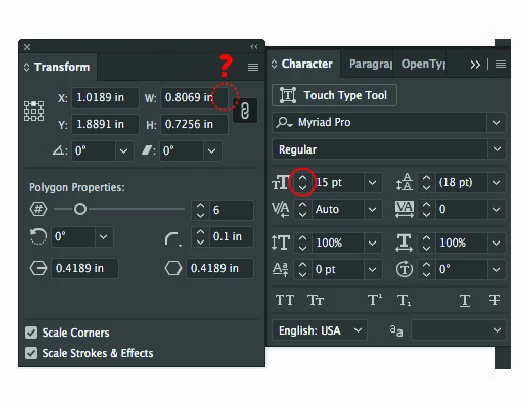
Why do I not have increment adjustment buttons available in my Transform window/panel?
    This topic has been closed for replies.
    Correct answer Bill Silbert

    To the best of my recollection there have never been incremental arrows in the Transform panel and I would imagine it is because unlike such panels as the Character one that you show the dimensions that are in the Transform fields do not increase in fixed increments. They represent dimensions or locations that can be just about anything and in just about every case there would little reason for fixed increments of growth or reduction. If you do want to increase or decrease something by a fixed amount you can add, subtract, divide or multiply the amount in the field by an amount that you choose. For example you could enter in the width field 0.8069+2pt and the dimension would be automatically calculated for you and applied. You can do the same with the other mathematical functions I mentioned. Just be aware that to multiply you use the * instead of a "x".

    3 replies

    Ton Frederiks
    Community Expert
    Community Expert
    August 12, 2017

    Never seen those.

    But click in the field and use the Up and Down arrows on you keyboard to get the same result (and use Shift, Alt or Cmd (Ctrl) as increment modifiers).

    Bill Silbert
    Community Expert
    Bill SilbertCommunity ExpertCorrect answer
    Community Expert
    August 12, 2017

    To the best of my recollection there have never been incremental arrows in the Transform panel and I would imagine it is because unlike such panels as the Character one that you show the dimensions that are in the Transform fields do not increase in fixed increments. They represent dimensions or locations that can be just about anything and in just about every case there would little reason for fixed increments of growth or reduction. If you do want to increase or decrease something by a fixed amount you can add, subtract, divide or multiply the amount in the field by an amount that you choose. For example you could enter in the width field 0.8069+2pt and the dimension would be automatically calculated for you and applied. You can do the same with the other mathematical functions I mentioned. Just be aware that to multiply you use the * instead of a "x".

    Monika Gause
    Community Expert
    Community Expert
    August 12, 2017

    You're totally right, Bill.

    What also works is just pressing the up and down arrows.

    Monika Gause
    Community Expert
    Community Expert
    August 12, 2017

    Which version and which system is it?

    When did you last restart the computer?
