andikm
Participating Frequently
January 19, 2024
Answered

Transform properties showing inches not pixels

  • January 19, 2024
  • 2 replies
  • 2684 views

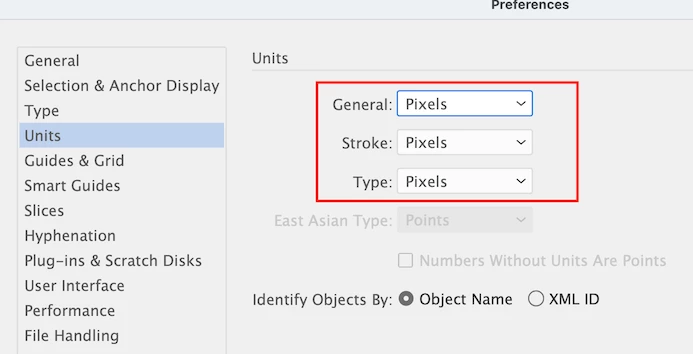
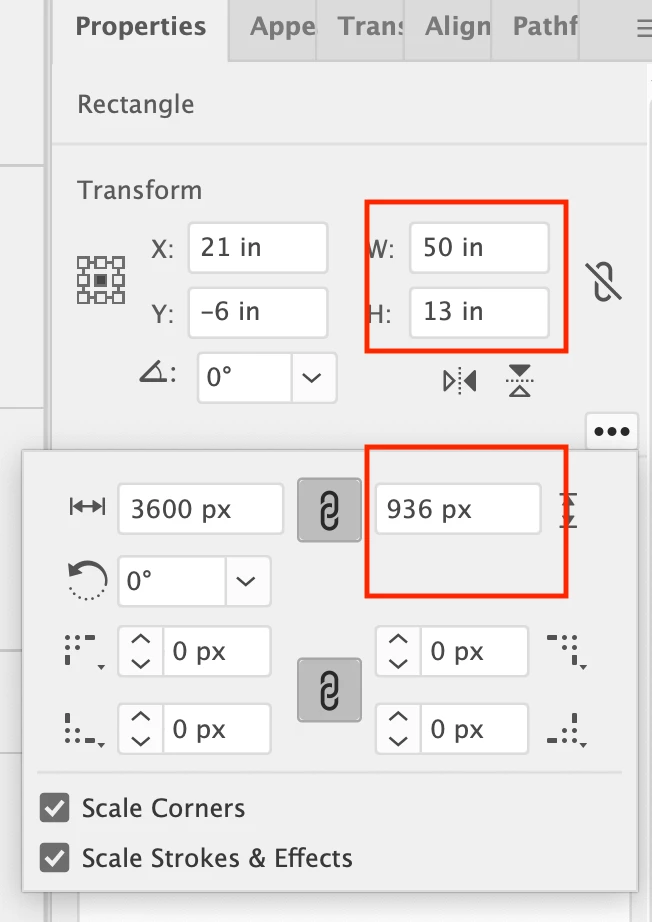
Not sure how or why, but my Transform Properties panel for shapes is now showing inches, even after setting all Units in Preferences to pixels.  If I right click on the three dots , re-shaping a shape shows in pixels? 


Adobe Illustrator 28.1

Apple iMac 12.7.2


Correct answer teriyaki86

Just had this issue, but found right clicking in the ruler section (command + R bring to bring the rulers up) fixed the units right away. 

2 replies

teriyaki86Correct answer
Participant
September 10, 2024

Just had this issue, but found right clicking in the ruler section (command + R bring to bring the rulers up) fixed the units right away. 

Monika Gause
Community Expert
Community Expert
January 19, 2024

The units in preferences are only applied to documents that do not have units.

In order to change the document unit of an existing document, right click the ruler.

andikm
andikmAuthor
Participating Frequently
January 19, 2024

Thank you so much for your reply,  but unfortunately that did not solve my problem.

I have created a shape , right clicked on the ruler and selected Pixels, but the shape properties still display inches. 

Also changed to Artboard Rulers and Global Rulers made no difference. 

Illustrator was working fine two days ago, not sure what I have done wrong  😞 


Monika Gause
Community Expert
Community Expert
January 19, 2024

How often do you reboot the system? Maybe now would be good?

Maybe Illustrator even needs a preferences reset. This will erase your settings.