Exit
  • Global community
    • Language:
      • Deutsch
      • English
      • Español
      • Français
      • Português
  • 日本語コミュニティ
  • 한국 커뮤니티
0

Transparency in 3D

Explorer ,
Jan 11, 2023 Jan 11, 2023

I watched a video, from a couple of years ago, about 3D in Illustrator. It rendered an object with transparency, creating a glass effect. Is this still possible? I can't seem to make it work.


TOPICS
Tools
4.4K
Translate
Report
Community guidelines
Be kind and respectful, give credit to the original source of content, and search for duplicates before posting. Learn more
community guidelines

correct answers 1 Correct answer

Community Expert , Jan 11, 2023 Jan 11, 2023

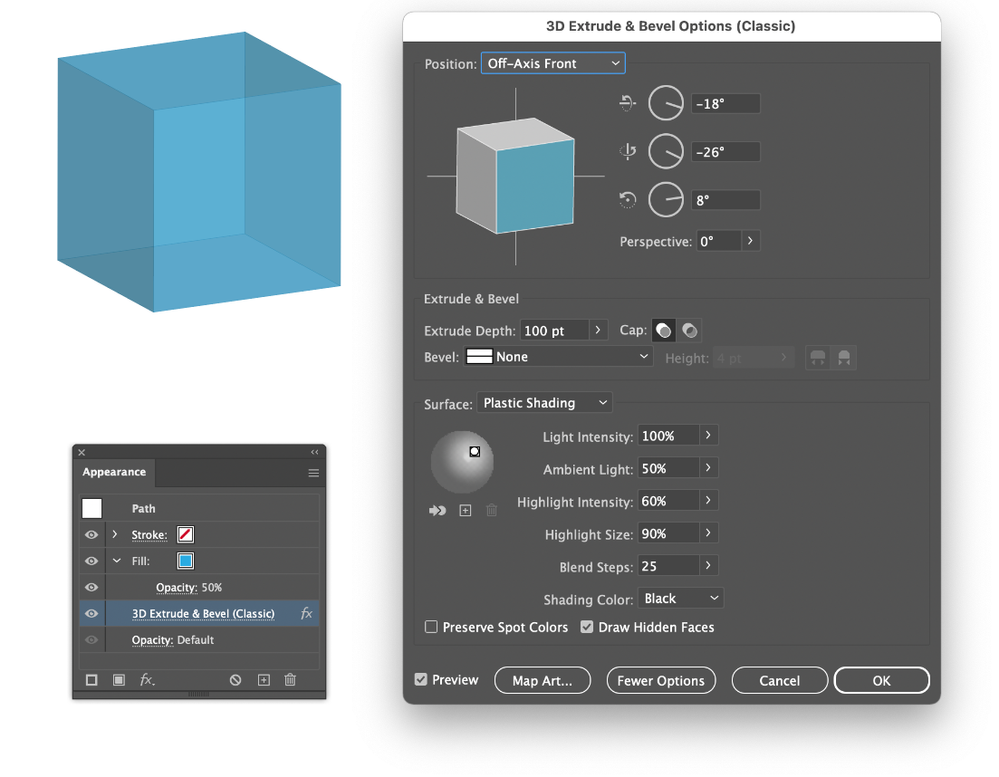
Screenshot 2023-01-11 at 15.47.30.png

Translate
Adobe
Community Expert ,
Jan 11, 2023 Jan 11, 2023

If you're asking whether it is possible to adjust the opacity of an object with the 3D effect, the answer is yes.

What have you tried and what didn't work?

Translate
Report
Community guidelines
Be kind and respectful, give credit to the original source of content, and search for duplicates before posting. Learn more
community guidelines
Community Expert ,
Jan 11, 2023 Jan 11, 2023

You need the Classic 3D effect with a transparent object and the option Draw Hidden Faces turned on.

Translate
Report
Community guidelines
Be kind and respectful, give credit to the original source of content, and search for duplicates before posting. Learn more
community guidelines
Community Expert ,
Jan 11, 2023 Jan 11, 2023

Screenshot 2023-01-11 at 15.47.30.png

Translate
Report
Community guidelines
Be kind and respectful, give credit to the original source of content, and search for duplicates before posting. Learn more
community guidelines
Explorer ,
Jan 11, 2023 Jan 11, 2023

Got it! Thanks!!

Translate
Report
Community guidelines
Be kind and respectful, give credit to the original source of content, and search for duplicates before posting. Learn more
community guidelines
Community Expert ,
Jan 11, 2023 Jan 11, 2023

Good to hear that helped.

Translate
Report
Community guidelines
Be kind and respectful, give credit to the original source of content, and search for duplicates before posting. Learn more
community guidelines
Participant ,
Feb 20, 2023 Feb 20, 2023

This solution does not work for me.  


I'm using the Classic 3D Effect.  My object is about 50% transparent and I have Draw Hidden Faces Checked.  Using a MAC. RunningAI 27.2.  Any suggestions?  Thanks.


Screenshot 2023-02-20 at 11.56.31 AM.png

Translate
Report
Community guidelines
Be kind and respectful, give credit to the original source of content, and search for duplicates before posting. Learn more
community guidelines
Community Expert ,
Feb 20, 2023 Feb 20, 2023

Try the opacity setting of the Fill color in the Appearance panel, not the bottom one.

Translate
Report
Community guidelines
Be kind and respectful, give credit to the original source of content, and search for duplicates before posting. Learn more
community guidelines
Participant ,
Feb 20, 2023 Feb 20, 2023

Gotcha.


Worked great.  Thanks.

Translate
Report
Community guidelines
Be kind and respectful, give credit to the original source of content, and search for duplicates before posting. Learn more
community guidelines
Community Expert ,
Feb 20, 2023 Feb 20, 2023

Good to hear you've got it working.

Translate
Report
Community guidelines
Be kind and respectful, give credit to the original source of content, and search for duplicates before posting. Learn more
community guidelines
Community Expert ,
Feb 20, 2023 Feb 20, 2023

But after doing that you may need to double the 3D effect item in the Appearance panel again to check it's settings (it can behave a little unwilling...).

Translate
Report
Community guidelines
Be kind and respectful, give credit to the original source of content, and search for duplicates before posting. Learn more
community guidelines
New Here ,
Dec 01, 2025 Dec 01, 2025

This is the exact result I need, but I can't for the life of me find the Draw Hidden Faces button, and everything I've looked up to find it, it's not where it says it should be. I'm using my Mac, but I'm also using CloudLab, which allows us to log in to the school computers from home. I don't know if that's affecting anything. I just know I found this button earlier and it disappeared and I need to make shapes with that glass effect.

Translate
Report
Community guidelines
Be kind and respectful, give credit to the original source of content, and search for duplicates before posting. Learn more
community guidelines
Community Expert ,
Dec 01, 2025 Dec 01, 2025

Can you show your 3D (Classic) effect optons window?

Translate
Report
Community guidelines
Be kind and respectful, give credit to the original source of content, and search for duplicates before posting. Learn more
community guidelines
New Here ,
Dec 01, 2025 Dec 01, 2025

Just you saying the classic part helped me find it, I still can't get the "outline" or "glass" look though. The oppacity just makes the whole thing lighter. I'm not very familiar with Illustrator so I apologize if this is something else simple I'm just not getting 

Translate
Report
Community guidelines
Be kind and respectful, give credit to the original source of content, and search for duplicates before posting. Learn more
community guidelines
Community Expert ,
Dec 01, 2025 Dec 01, 2025

Please show the appearance panel for the object. It may be that (as Ton advises above) you need to change the opacity of the fill rather than the object.

Translate
Report
Community guidelines
Be kind and respectful, give credit to the original source of content, and search for duplicates before posting. Learn more
community guidelines
Community Expert ,
Dec 01, 2025 Dec 01, 2025

In the Classic 3D dialog there is a button More Options that you can click for more options like Draw Hidden Faces.

Translate
Report
Community guidelines
Be kind and respectful, give credit to the original source of content, and search for duplicates before posting. Learn more
community guidelines
Community Expert ,
Dec 01, 2025 Dec 01, 2025
LATEST

And make sure you changed the opacity of the Fill instead of the entire object.

Screenshot 2025-12-01 at 17.26.20.png

Translate
Report
Community guidelines
Be kind and respectful, give credit to the original source of content, and search for duplicates before posting. Learn more
community guidelines