Inspiring
July 4, 2019
Question

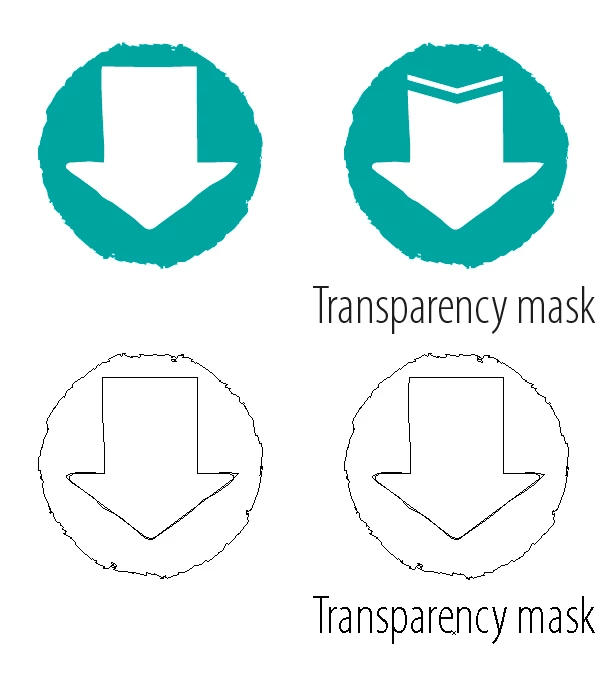
• Transparency mask not taken into account when using PathItem.translate()???

  • July 4, 2019
  • 2 replies
  • 2232 views

Hello -

I won't explain all the "process" or the reason why I'm using a script for this, but…

I made a script to moving a manually saved selection via "PathItem.translate()".

Until now, I though that everything works like a charm.

Until a colleague of mine told me that "transparency mask" where not moved!  Even they where part of the selection.

If I do the operation manually (ie. moving the selection), everything is moving.

When I do it via scripting, well looks like the transparency masks are leaved on their original location. all the rest is moved.

NB. Of course they linked, not "locked", …

The line of code:

pgItem.translate( 50, 0 );

Any idea why?

Thank you,

- Dimitri

This topic has been closed for replies.

2 replies

CarlosCanto
Community Expert
Community Expert
May 9, 2020

unfortunately all of the old threads didn't make it to the new forum format. Let me alert employees to try to get it back.

Charu Rajput
Community Expert
Community Expert
May 9, 2020

Yes, that will be great for future reference too and new comers to the forums.


Thanks

Best regards
CarlosCanto
Community Expert
Community Expert
July 4, 2019

that's a known issue, check this thread for a solution


Scripts Don't Move Opacity Masks

Inspiring
July 5, 2019

Hey Carlos -

Thank you for your answer.

W0W now that's a piece of code just to be able to move an "opacity/transparency mask"  :-0

Do I really have to embed all this code to "force" Illustrator to take into account a small opacity/transparency mask (when I'm scripting)?

Thank you for your upcoming feedback.

Regards,

- Dimitri

CarlosCanto
Community Expert
Community Expert
July 5, 2019

the short answer is yes, you have to use all those lines of code to move small or big opacity masked objects.