
Participant
August 1, 2023
Answered

Transparency Window Missing Mask Function

  • August 1, 2023
  • 4 replies
  • 1690 views

I'm trying to follow tutorials on making an opacity mask, but the tutorials all show that the Transparency window has a mask function in it, where you can link objects and their gradient masks, like this:
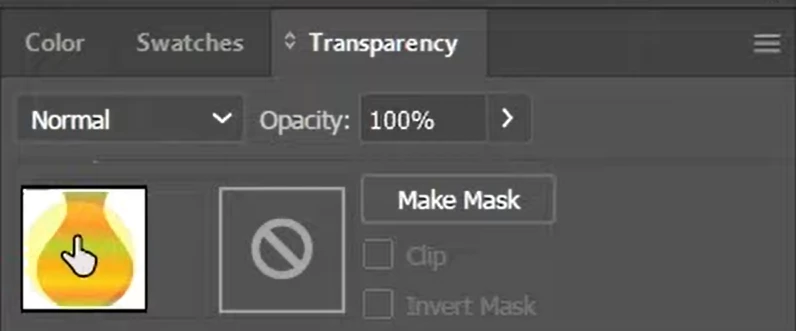
This doesn't exist in my version of Illustrator. My transparency window looks like this:
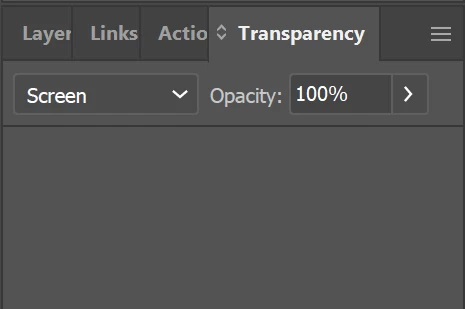
I'm using the latest version of Illustrator and have searched the UI and the mask function appears to be missing. Was this functionality removed? If so, how can I apply a gradient mask to an object now?

Correct answer Matthew27588859y69k

I found the solution. The masking dialogue was revealed by clicking these miniscule arrows next to the Transparency tab title. 
Unnecessary. 

4 replies

Participant
May 5, 2025

In my case in AI 2021:

Go to transparency mask and to the three lines and click ----> Show Thumbnails and it will appear. 

Matthew27588859y69kAuthorCorrect answer
Participant
August 1, 2023

I found the solution. The masking dialogue was revealed by clicking these miniscule arrows next to the Transparency tab title. 
Unnecessary. 

Larry G. Schneider
Community Expert
Community Expert
August 1, 2023

Does it still look the same if you select Normal instead of Screen from the dropdown menu?

Participant
August 1, 2023

Yep. Blend mode doesn't matter.

Monika Gause
Community Expert
Community Expert
August 1, 2023

Does a reboot solve this?

Participant
August 1, 2023

Nope.