ericm10089679
Inspiring
August 25, 2023
Answered

Transparent offset path?

  • August 25, 2023
  • 1 reply
  • 2344 views

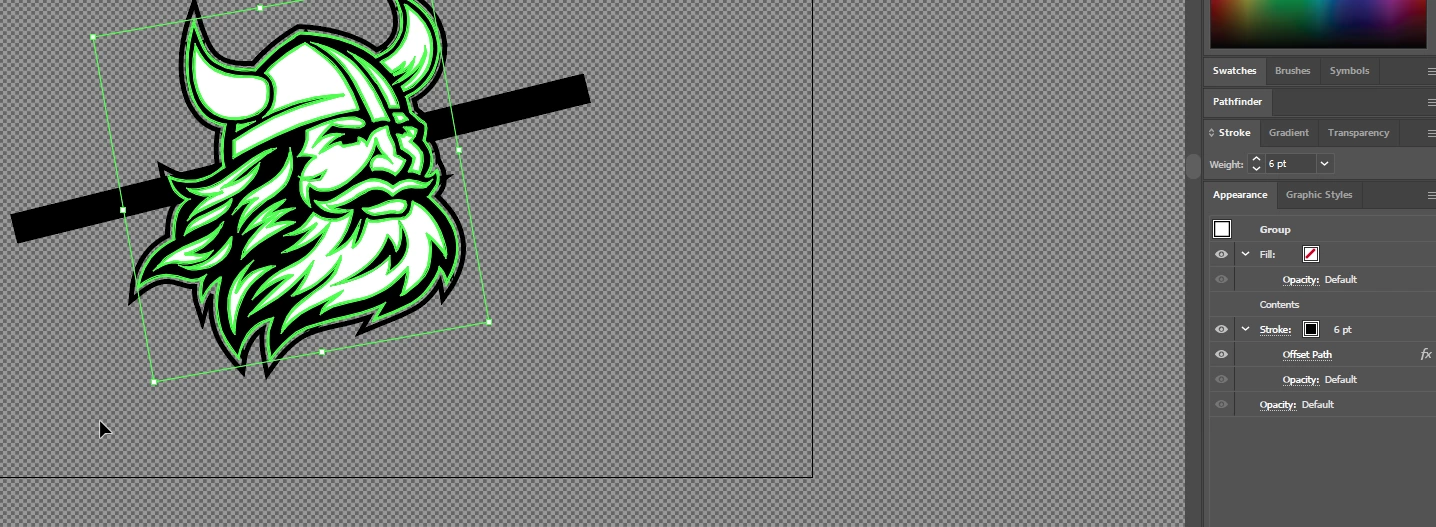
I think I am trying to do the wrong thing and I am not so good with the terminolgy. I am using an offset path to create a border around the viking however, I want it to cut out everything behind it leaving a space and everything white will actually be transparent. The second image is what I've done.  Right now the offset path is the farthest black line around the viking head. 



This topic has been closed for replies.
Correct answer Monika Gause

That added stroke is the beginning of a knockout group. I would have used a fill instead of a stroke. But if you make that stroke fatter, it will work.

Apply Opacity = 0% to that stroke (the stroke has an opacity of its own in the appearance panel)

Then group all the stuff including the objects you want to punch through.

Then make the group a knockout group. 

You might need to go to CPU preview.

1 reply

Monika Gause
Community Expert
Community Expert
August 25, 2023

You can apply an opacity of 05 to the fill of the offset.

Then group everything and make it a knockout group.


Or do you need to cut this with a plotter? In that case you will need to use Pathfinder functionality


Please show us what is in the layers panel

ericm10089679
Inspiring
August 25, 2023

I initally, added a stroke in the appearance menu, moved it below content, selected Pathfinder, Add. Then Selected the added stroke in the appearance window, then Effect > Path> Offset Path.  However I think that was incorrect and I should be using a knock out group insead.  Here is a post that I found, it seems a little above my head, but I am going to wade through it. https://community.adobe.com/t5/illustrator-discussions/is-there-any-trick-of-how-to-do-this-thing/m-p/13968508#M374935

Monika Gause
Community Expert
Monika GauseCommunity ExpertCorrect answer
Community Expert
August 25, 2023

That added stroke is the beginning of a knockout group. I would have used a fill instead of a stroke. But if you make that stroke fatter, it will work.

Apply Opacity = 0% to that stroke (the stroke has an opacity of its own in the appearance panel)

Then group all the stuff including the objects you want to punch through.

Then make the group a knockout group. 

You might need to go to CPU preview.