 Adobe Community

- Home
- Illustrator
- Discussions
- Re: Trim work as Divide, whats wrong? Help :)
- Re: Trim work as Divide, whats wrong? Help :)

Copy link to clipboard
Copied



 1 Correct answer


There is some appearance applied to that object. It's not overprinting and not transparency. But when you get rid of all appearances (use the button to delete them in the appearance panel), then the pathfinder works as expected.
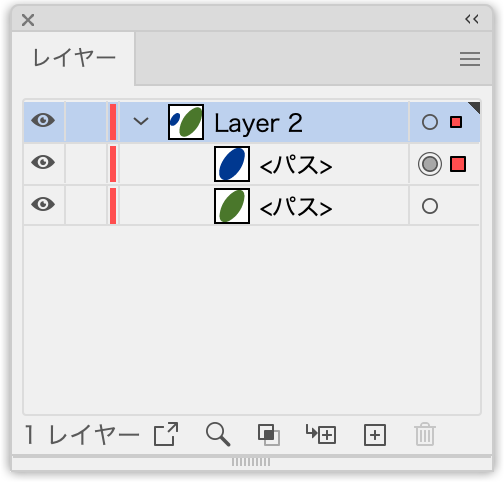
The layers panel tells you that there is something with that grey target symbol, which is that circle (I hope the Japanese interface doesn't distract you too much):

Explore related tutorials & articles
 17
Replies
17
17
Replies
17


Copy link to clipboard
Copied
Alёxander,
It could be a temporary/mild corruption.
If it happens in more then one document, you can try to close down/reopen AI, or close down/restart the computer, or you can reset your preferences,
https://helpx.adobe.com/illustrator/using/setting-preferences.html
Copy link to clipboard
Copied
It happens from time to time, in different documents. It suddenly happens in the middle of the process with few random shapes while triming of all other shapes work perfect. Close down/reopen AI, restart PC and reset preferences don't help. Same thing in AI CC, AI 2020, AI of sranger if i send file to him.
Copy link to clipboard
Copied
Another annoying problem is this small lines after Trim

Copy link to clipboard
Copied
Is there a blending mode applied to that blue object?
Copy link to clipboard
Copied
Actually no, but the green one was created by using shape builder.

Copy link to clipboard
Copied
Can you share a sample Illustrator file that has this issue?
Copy link to clipboard
Copied
Got an error. The attachment's content type (application/postscript) does not match its file extension and has been removed.
Copy link to clipboard
Copied
Just upload it to Dropbox or the like and post a link to it
Copy link to clipboard
Copied
Copy link to clipboard
Copied
There is some appearance applied to that object. It's not overprinting and not transparency. But when you get rid of all appearances (use the button to delete them in the appearance panel), then the pathfinder works as expected.
The layers panel tells you that there is something with that grey target symbol, which is that circle (I hope the Japanese interface doesn't distract you too much):
Copy link to clipboard
Copied
How can i understand when and what "appearance" applied to that object? Because it happened with some random objects.
Copy link to clipboard
Copied
The Layers panel will show you if something is applied. The target symbol (the circle) will then be filled.
What exactly it is, will then be shown in the Appearance panel. Click on the circle and open the panel to see it.
But in this case it is weird, because the Appearance panel doesn't show anything.
Copy link to clipboard
Copied
As i investigate further, i found out that it is happened because im using Actions for opacity changing to 35% and back to 100% and that "opacity 100%" is that weird Appearance.

Copy link to clipboard
Copied
Do you have additional plug-ins installed?
Copy link to clipboard
Copied
No
Copy link to clipboard
Copied
Your other problem could be caused by the Precision setting in the Pathfinder panel options, try if a very low setting helps.
Copy link to clipboard
Copied
If i set Precision to 0,001, they just become smaller but bot dissapear.


 AdChoices