


Participant
June 9, 2020
Answered

Trouble with elipse tool and strokes

  • June 9, 2020
  • 2 replies
  • 830 views

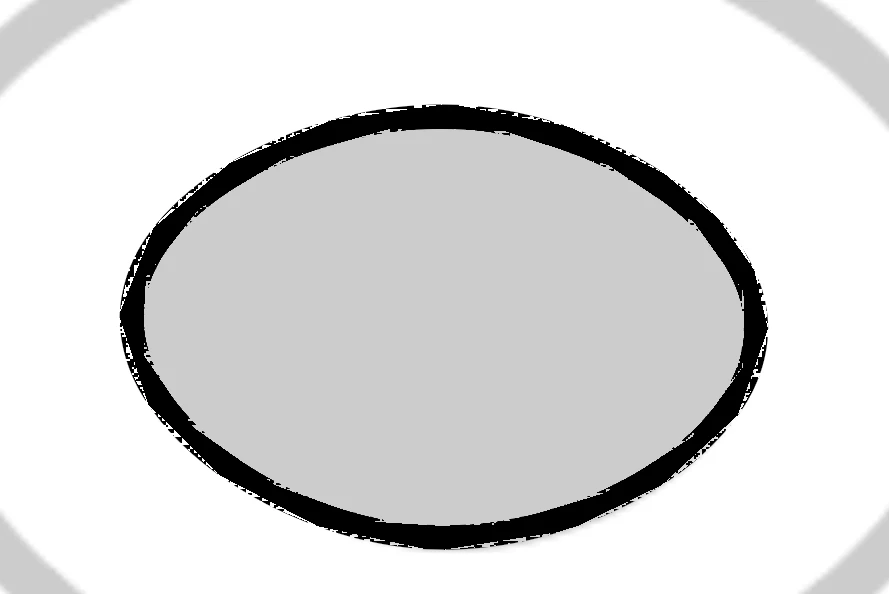
I am very new to using Illustrator, but I am having troubles with the elipse tool and it not creating a solid stroke. The strokes are crisp and clean with the other shape tools (rectangle, polygon etc.) but for some reason the elipse always comes out looking like it was drawn with a pen that is running low on ink. 

I have checked the settings and they all seem to say that it is still on solid stroke, I have tried making the same shape over and over with the correct settings but it isn't working. This is what it comes out looking like (zoomed for detail).
 

This topic has been closed for replies.
Correct answer Ton Frederiks

Maybe it is a preview problem.

Try View > CPU Preview

2 replies

Ton Frederiks
Community Expert
Ton FrederiksCommunity ExpertCorrect answer
Community Expert
June 9, 2020

Maybe it is a preview problem.

Try View > CPU Preview

qniuuAuthor
Participant
June 9, 2020

That worked! Thank you so much! 

Ton Frederiks
Community Expert
Community Expert
June 9, 2020

Good to hear that helped.

You can turn it off permanently if you wish in Preferences > Performance > GPU Performance

qniuuAuthor
Participant
June 9, 2020

*Ellipse 

Sorry I am very upset!