
Turn a bunch of line drawings into unconnected line segments
I'm new to Illustrator and I want to make a repeating pattern of shapes slowly appear to fall apart as it moves from left to right. Thing of a piece of grid paper where the lines of the grid slowly start to vanish into white space.
I created my basic shape (a hexagon with internal lines) and the copied-and-pasted it over and over to create the "grid paper" that I want to start with, but I want to then delete individual line segments, not the hexagons or internal triangles that were created.
The .ai file I built is here (some bug won't let me post it), and here's a screenshot of what I'm trying to create (I modeled in Sketchup, but want to learn how to use Illustrator for this).
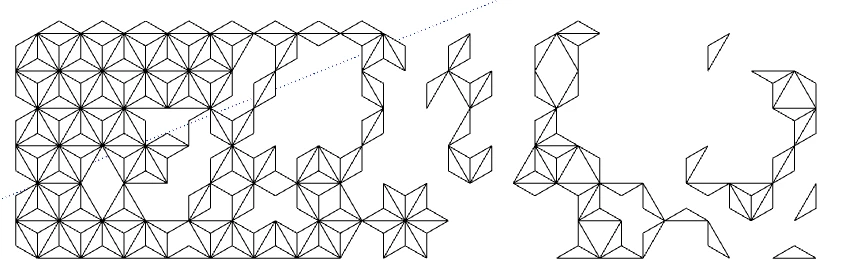
You'll see in the Illustrator file that the repeating shape I made isn't line segments, it's just a bunch of shapes on top of each other. I want to just be able to convert the whole image into one shape with a bunch of line segments and then be able to delete those to make interesting ways of "falling apart"
 AdChoices