
Copy link to clipboard
Copied
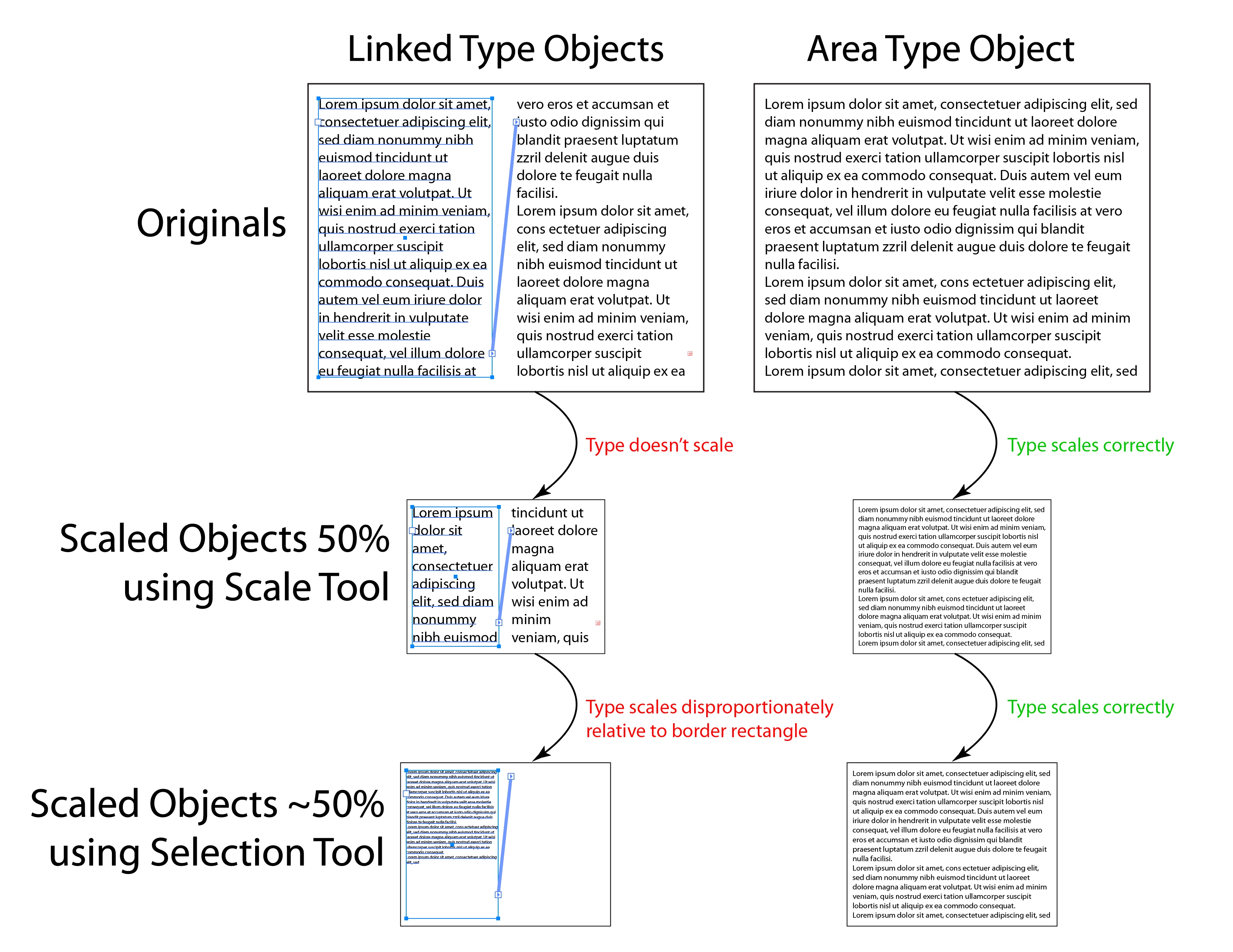
I’ve just recently started having an issue with Illustrator’s linked type objects. Often when I re-size linked type boxes, I don’t want the text inside to scale relative to the object, I just want the entire object and text to scale perfectly together. I’ve long been accustomed to creating a solid rectangle above the area type boxes (or a border), which causes Illustrator to treat the selection of multiple objects as one and scale everything. Suddenly, seemingly after the update to version 29.7.1, the linked text inside the box does not scale (using the Scale tool) or scales disproportionately (using the Selection tool).
The Free Transform Tool currently appears to be the only way to scale these objects together while keeping the type size proportional to the objects being scaled.
When and how has this behavior changed? Am I missing something?
Screen shot attached.
Thanks in advance for your help!
Copy link to clipboard
Copied
Hi @ssamanen,
Thanks for sharing the details along with the screenshot. To better understand what's happening, could you share a short screen recording showing the full workflow and how the scaling behaves in action? It would also help if you could test the same steps in the latest Illustrator 29.8 version and confirm if the issue still occurs.
Could you also let me know the exact OS version you're working on and whether this behavior is consistent across brand-new documents as well?
Looking forward to your update.
Abhishek
Copy link to clipboard
Copied
Thanks for the reply! This happens with new and old documents, and I have only noticed it with the latest version of Illustrator, 29.7. I don't have 29.8, and the Adobe app says 29.7 is the latest version, so I guess I'd have to install a beta version to get 29.8?
I'm running MacOS 15.6.1, on a Mac Pro (2019)
Thanks in advance for your help!
Copy link to clipboard
Copied
It scales proportionally if you use the transform pallette but doesnt work if you try doing manually with the bounding box or with the scale tool as you demonstrated - super annoying
Copy link to clipboard
Copied
Hello @savemetropolis182,
Sorry to hear you're having similar trouble with Illustrator. I tried replicating this behavior on my end but could not. Could you share a small screen recording of your exact workflow and the problem, so I can check this with the team? Also, try installing an earlier version of Illustrator (https://adobe.ly/46vi78e) and share your observations.
Looking forward to hearing from you.
Anubhav
Copy link to clipboard
Copied
Please see my earlier reply that is two above yours. You will find the screen recording. That is a new document in Illustrator 29.7.
Copy link to clipboard
Copied
Yes, there are some inconsistencies with scaling threaded text boxes.
Scaling with the bounding box does not work, it only scales the boxes but not the content.
Scaling with the Scale tool works in previous versions like 2023/24 but not in 2025.
Scaling using the Transform panel gives strange results in 2023/24 but works correct in 2025.
Copy link to clipboard
Copied
@ssamanen It would be useful to report this at UserVoice: https://illustrator.uservoice.com/
Copy link to clipboard
Copied
Thanks! I'm surprised not many people seem to be having the issue. Could it be related to the processor? I have a 2019 Mac Pro with Intel Xeon W. Are you using an Apple Silicon machine?
Copy link to clipboard
Copied
I use an MacBook Pro, M2, 2022. It is clearly misbehaving and different between versions.
Copy link to clipboard
Copied
Thanks! I was hoping to either hear back from Abhisheck or Anubhav, or learn that there was a fix for this, but in the meantime I've reported it here: https://illustrator.uservoice.com/forums/601447-illustrator-desktop-bugs/suggestions/50497311-bug-ty...
Copy link to clipboard
Copied
Thanks, voted!
Copy link to clipboard
Copied
Hello @ssamanen,
Thanks for your patience. We have reported this to the product team, and they are currently investigating the issue. I will update this thread as I have more info.
Feel free to reach out if you have more questions or need assistance. We'd be happy to help.
Anubhav
Copy link to clipboard
Copied
Was having the same issue - Reverted back to Illustrator 29.8.1 from 29.8.2 and it fixed the problem.
Running Sonoma 14.3.1 - 24 inch iMac 2023
Copy link to clipboard
Copied
Thank you for verifying. As mentioned above, we have logged a bug for the issue, and the team is investigating it. Please stay tuned to the UserVoice page shared above for updates.
We will also update here if the team requires any additional details.
Thanks,
Harshika
Copy link to clipboard
Copied
Thank you for reporting the issue on UserVoice. As Egor mentioned in UserVoice, "Threaded text indeed becomes very broken in the latest AI builds."
We are also confirming with the team if they need any other details from you to investigate this issue.
We will keep you posted on this issue.
Thanks,
Harshika
Find more inspiration, events, and resources on the new Adobe Community
Explore Now