Exit
  • Global community
    • Language:
      • Deutsch
      • English
      • Español
      • Français
      • Português
  • 日本語コミュニティ
  • 한국 커뮤니티
0

UI dropdown list

Explorer ,
Jul 19, 2019 Jul 19, 2019

Hello everybody

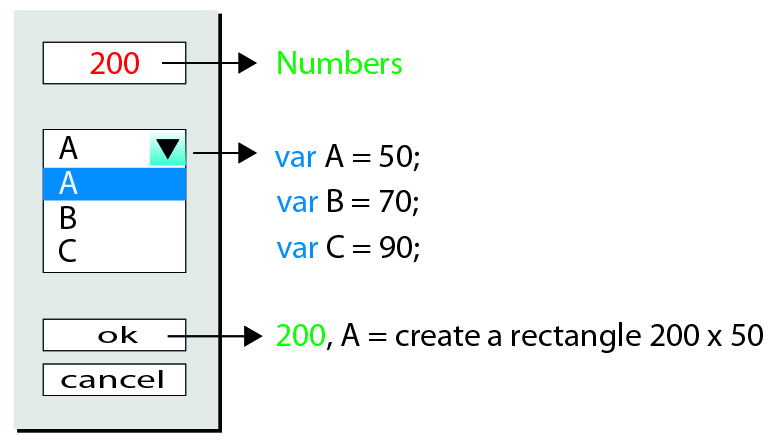
I tried to create a a script based of window panel as in the picture below but I did not succeed..

One field is for input values  and the second field contains a  dropdown list

The result creates a rectangle...

Thanks in advance,

Nick

sample panel-01.jpg

TOPICS
Scripting
1.4K
Translate
Report
Community guidelines
Be kind and respectful, give credit to the original source of content, and search for duplicates before posting. Learn more
community guidelines
Adobe
Contributor ,
Jul 19, 2019 Jul 19, 2019

Hello,

here you can find the script written in TypeScript: adobe-forums-scripts/Menu_UI_Rectangle.ts at master · lumenn/adobe-forums-scripts · GitHub

and below, you can find a compiled, ready to run in illustrator version:

// There should be added validation for the input, because now it can also receive letters, and other characters than digits.

function showRectangleCreationPanel() {

    var x = 0;

    var y = 0;

    var unit;

    var units = ['pt', 'in', 'mm', 'cm', 'px'];

    var heightNames = ['A', 'B', 'C'];

    var heights = {

        A: 50,

        B: 70,

        C: 90

    };

    var rectanglePanel = new Window("dialog", "Fill fill rectangle data", undefined, { borderless: true });

    var widthGroup = rectanglePanel.add("group", undefined);

    widthGroup.orientation = "row";

    var widthTextField = widthGroup.add("edittext");

    widthTextField.characters = 4;

    var unitDropDown = widthGroup.add("dropdownlist", undefined, units);

    unitDropDown.selection = unitDropDown.items[0];

    var heightDropDown = rectanglePanel.add("dropdownlist", undefined, heightNames);

    heightDropDown.selection = heightDropDown.items[0];

    rectanglePanel.add("button", undefined, "OK");

    rectanglePanel.add("button", undefined, "Cancel");

    rectanglePanel.show();

    unit = unitDropDown.selection.text;

    x = Number(new UnitValue(widthTextField.text + " " + unit).as('pt'));

    y = Number(new UnitValue(heights[heightDropDown.selection.text] + " " + unit).as('pt'));

    return [x, y];

}

function createRectangle(_a) {

    var x = _a[0], y = _a[1];

    var rectangle;

    var document = app.activeDocument;

    var top = document.activeView.centerPoint[1];

    var left = document.activeView.centerPoint[0];

    var height = y;

    var width = x;

    rectangle = document.activeLayer.pathItems.rectangle(top + height / 2, left - width / 2, width, height);

    return rectangle;

}

var rectangleSize = showRectangleCreationPanel();

createRectangle(rectangleSize);

Translate
Report
Community guidelines
Be kind and respectful, give credit to the original source of content, and search for duplicates before posting. Learn more
community guidelines
Explorer ,
Jul 19, 2019 Jul 19, 2019

Nice and clean!

Thank you very much for your help!

Translate
Report
Community guidelines
Be kind and respectful, give credit to the original source of content, and search for duplicates before posting. Learn more
community guidelines
Explorer ,
Sep 18, 2019 Sep 18, 2019
Hello
Translate
Report
Community guidelines
Be kind and respectful, give credit to the original source of content, and search for duplicates before posting. Learn more
community guidelines
Explorer ,
Sep 18, 2019 Sep 18, 2019
LATEST
how to make the cancel button to be active. At this point when I press the cancel button the script continues to work...Thanks
Translate
Report
Community guidelines
Be kind and respectful, give credit to the original source of content, and search for duplicates before posting. Learn more
community guidelines