
Participant
October 13, 2023
Answered

UI Element design in Illustrator help. How to get gradient look for buttons, behind elements etc.

  • October 13, 2023
  • 1 reply
  • 420 views

Hiya! I licensed and downloaded this UI template because I wanted to figure out how they used this shading technique but cannot for the life of me figure out how they created them. Does anyone know how I could recreate something similar for my own elements and shapes? It looks like there were offset topo lines used or layers? I can link the file here along with some screenshots.

This topic has been closed for replies.
Correct answer Monika Gause

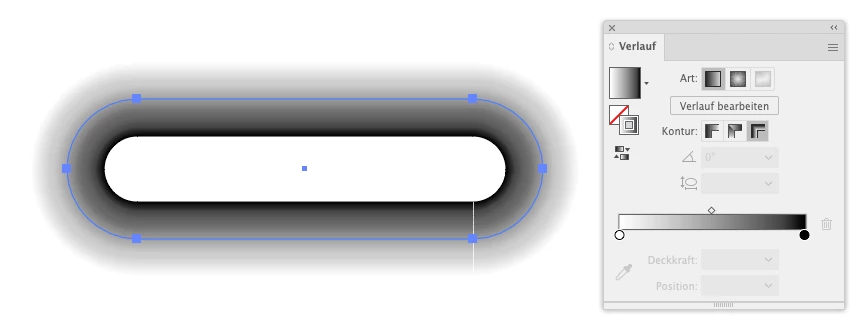
Those are gradient meshes.

You can create them by applying a thick stroke, put a gradient on a stroke across the path.
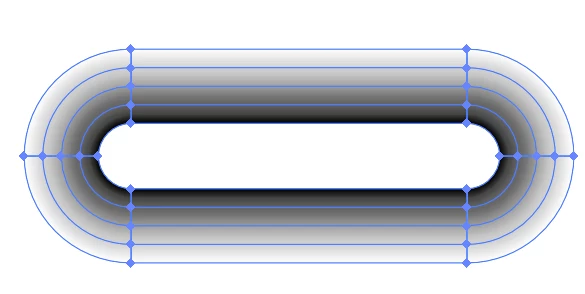
Expand Appearance gives you the mesh
 

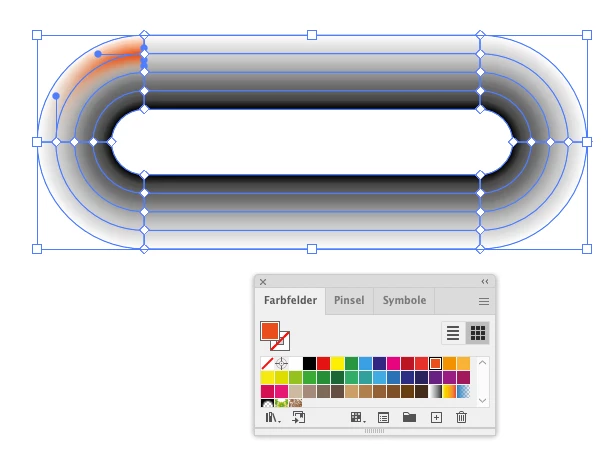
Then you can recolor the mesh points
1 reply

Monika Gause
Community Expert
Monika GauseCommunity ExpertCorrect answer
Community Expert
October 13, 2023

Those are gradient meshes.

You can create them by applying a thick stroke, put a gradient on a stroke across the path.

Expand Appearance gives you the mesh


Then you can recolor the mesh points

brelynh17Author
Participant
October 13, 2023

OH MY GOSH thank you so much! You're amazing I greatly appreciate your help!

Monika Gause
Community Expert
Community Expert
October 13, 2023

You're welcome and thank you for your kind words.