
Inspiring
January 15, 2025
Question

Un-close pasted path

  • January 15, 2025
  • 2 replies
  • 840 views

I've got a pattern of abstract paths in Photoshop that I've pasted into Illustrator. So far so good. However, both programs have a habit of automatically closing shapes.

 In Illustrator, the shape (see bleow) is automatically closed (whereas the left hand side should be open).

In order to fix this I'm currently having to locate each shape, direct selection of each point, cut it, paste it in place and then re-apply stroke to it. Like the shape as I want it!
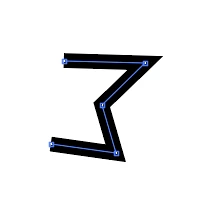
This process is fine for a couple, but really rather long winded for hundreds of shapes. 

Is there an easy/faster/better/cheaper way of solving this? What have I missed?


As always, answers on a postcard...


2 replies

Kurt Gold
Community Expert
Community Expert
January 15, 2025

Based on your screenshot it looks as if your closed path is an appearance (possibly a pathfinder effect at the layer level) or a compound shape.


To verify that, you could share a sample Illustrator file with the object shown in your screenshot.

Inspiring
January 16, 2025

There's an idea. Here's a very minimal copy of the file with just the open and closed versions. 


Monika Gause
Community Expert
Community Expert
January 16, 2025

If you want to share a file, please use the forum's web interface. Change the file extension to .pdf.

Monika Gause
Community Expert
Community Expert
January 15, 2025

How do these shapes exist in your Photoshop file? Are they shape layers? Just paths in the Paths panel?

Inspiring
January 15, 2025

Just a vaniall paths from path panel. Not a shape or a Shape in the path panel.

Monika Gause
Community Expert
Community Expert
January 15, 2025

I have just tried pasting multiple open paths from Photoshop into Illustrator and didn't have issues. They stayed open.