

bryyy_an
Participant
September 9, 2021
Answered

Unable to rearrange Artboard in Illustrator v25.4.1 on Windows 10

  • September 9, 2021
  • 2 replies
  • 610 views

If anyone can help me out this has been a headache for awhile and I have just been brushing it off doing a manual alignment for artboards but its about time to figure out why I seem to be the only one with this issue.


I can change all the quantities in the rearrange artboard popup window, choose different alignment directions, and spacing, but the issue is the confirmation button [okay] doesnt respond. No matter what options I have in the popup window, the window remains open and there is no response from Illustrator. The odd thing is there is no loading wheel, this feature just doesn't work for me... go figure.


Please help!
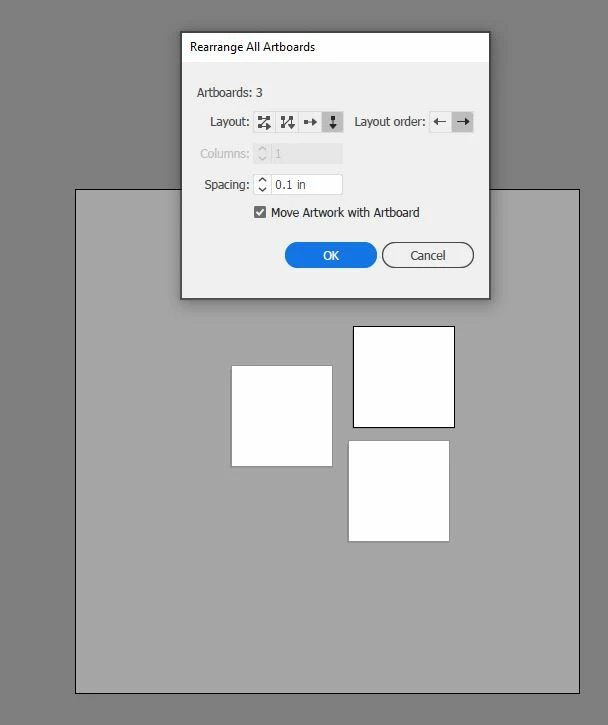


{Renamed by MOD}


This topic has been closed for replies.
Correct answer Ton Frederiks

Did you try to restart your machine / Illustrator?

Or reset your preferences: 

https://helpx.adobe.com/illustrator/using/setting-preferences.html

2 replies

Anshul_Saini
Community Manager
Community Manager
September 9, 2021

Hi there,


Sorry about the trouble. I would like to know if the steps suggested above by @Ton Frederiks worked for you? If not, I would request you to share a few more details like:

  • Operating System
  • Is the issue related to a specific document?
  • Could you please share the document with us? You can upload it to the Creative Cloud (https://helpx.adobe.com/in/creative-cloud/help/share.html) and share the download link.
  • When did this start happening? Are there any recent changes made to your system? For example, any antivirus, system updates, or web extensions installed recently.


You may try running the app in Safe Mode (Mac/ Windows) and share your observation. Also, you can try reinstalling the application using the Cleaner tool to remove the application completely. 
Disclaimer: Please note that by doing this, you will remove all the custom settings, and Illustrator will Install with default settings. You can also take a backup of the folders in case you want to. The location is mentioned below.
Remove all Illustrator related folders manually from the following locations: 
Windows: 

  • C:\Users\<your username>\AppData\Roaming\Adobe 
  • C:\Users\<your username>\AppData\Local\Adobe
  • C:\Program Files\Adobe

macOS: 

  • ~/Library/Application Support/Adobe  
  • ~/Library/Caches 
  • ~/Library/Preferences 
  • Finder > Applications 
  • Reinstall the application from Creative Cloud


Let us know how it goes. We'd be looking forward to your response.


Thanks & Regards,

Anshul Saini

Ton Frederiks
Community Expert
Ton FrederiksCommunity ExpertCorrect answer
Community Expert
September 9, 2021

Did you try to restart your machine / Illustrator?

Or reset your preferences: 

https://helpx.adobe.com/illustrator/using/setting-preferences.html

bryyy_an
bryyy_anAuthor
Participant
September 14, 2021

Thank you Ton! After resetting my preferences and restarting Illustrator my machine can now use the rearrange artboard function. Now I am trying to back step my preferences to figure out what was disabling this feature. If I figure out the bug after trial and error I will update this post.


For everyones reference, My current system specs will be listed below, although this has been an issue for awhile, I can't recall which version it began happening on.

Specs:

Adobe Illustrator 25.4.1

OS: Windows
Version: 10.0
Process Architecture: x86_64

Ton Frederiks
Community Expert
Community Expert
September 14, 2021

Good to hear that helped.