Participant
December 4, 2019
Answered

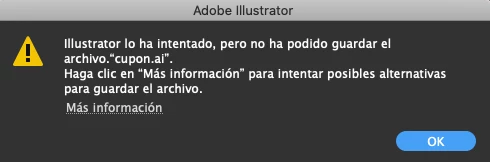
Unable to save file in Illustrator on an external hard drive.

  • December 4, 2019
  • 2 replies
  • 5013 views

 Hi everyone, few days ago I found my Illustrator have a problem with the saving options, when I want to save in an external hard drive.

Am I the only one with this problem?

Anyone knows how to solve this problem?


This topic has been closed for replies.
Correct answer Shelleebell64

I FIXED IT MYSELF. I just updated to macOS Monterey 12.3.1 today, April 12, 2022. After the update, I was unable to save my AI files to my external HD without receiving a message that "the file was open in another application and could not be saved" or that I did not have priveleges to save the file as it was "read only."


Quit out of your programs.

Go to System Preferences

Click Security & Privacy

Click the Privacy tab

Click the lock to make changes and enter your password if this is protected

On the left, scroll down to Full Disk Access

On the right, make sure that AI, Photoshop, Indesign, and any other promgrams you use are CHECKED

Click the lock to keep changes from being made

Restart your programs.


I tested this numerous times and it seems to be resolved. Nothing as effective as an angry graphic designer with no IT dept.

2 replies

Shelleebell64
Shelleebell64Correct answer
Participant
April 13, 2022

I FIXED IT MYSELF. I just updated to macOS Monterey 12.3.1 today, April 12, 2022. After the update, I was unable to save my AI files to my external HD without receiving a message that "the file was open in another application and could not be saved" or that I did not have priveleges to save the file as it was "read only."


Quit out of your programs.

Go to System Preferences

Click Security & Privacy

Click the Privacy tab

Click the lock to make changes and enter your password if this is protected

On the left, scroll down to Full Disk Access

On the right, make sure that AI, Photoshop, Indesign, and any other promgrams you use are CHECKED

Click the lock to keep changes from being made

Restart your programs.


I tested this numerous times and it seems to be resolved. Nothing as effective as an angry graphic designer with no IT dept.

Scotty Art®
Participant
April 17, 2022

OMG THANK YOU! I have been on the search for this sudden issue for the last 24 hours with no resolve. Seems to be working so far!

Rishabh_Tiwari
Legend
December 4, 2019

Hi there,


Sorry to hear about the trouble you are facing with Illustrator while saving the files. I would request if you can share a few more details like:


  1. The version of Illustrator and the Operating System.
  2. Are you able to save the files locally?
  3. Is the issue related to a specific document? Please try saving any other file on the external hard drive.


All this information would help us understand the issue better and work accordingly. Looking forward to your response.


Regards

Rishabh

Participant
December 4, 2019

Hi there,

I have the new version 2020 of Illustrator and the Operating System is macOS Catalina.
About the second question, yes I can save the files in my desktop, so when I save the file in the desktop I just move the file to de external Hard Drive.
This issues are related to every file that I want to save on the external HD.


Regards

Giovanni Osoria
Graphic Design Manager
{Personal Information removed by MOD}

Rishabh_Tiwari
Legend
December 5, 2019

Thanks for providing additional information, Giovanni. Could you please check if the Illustrator is on v24.0.1? Also when you get this error, could you please click on more information and if possible please take a screenshot and share it with us.