

B_C_E_75
Inspiring
June 16, 2020
Answered

Unable to Shift+Drag objects in Illustrator 2020 (24.2)

  • June 16, 2020
  • 20 replies
  • 17953 views

Just updated Illustrator a few hours ago and have noticed that when I try to click+shift and drag any object, it just...won't. The object highlights as usual when selected, but when I drag the object I get a quick view of the object dragging but it snaps back in place.  Im on a pretty powerful HP Z4 Workstation with up to date Windows 10 Pro. This was working fine earlier today, but I'm not having any luck in fixing this issue now.


{Renamed by MOD}
Correct answer Srishti Bali

Hi all,


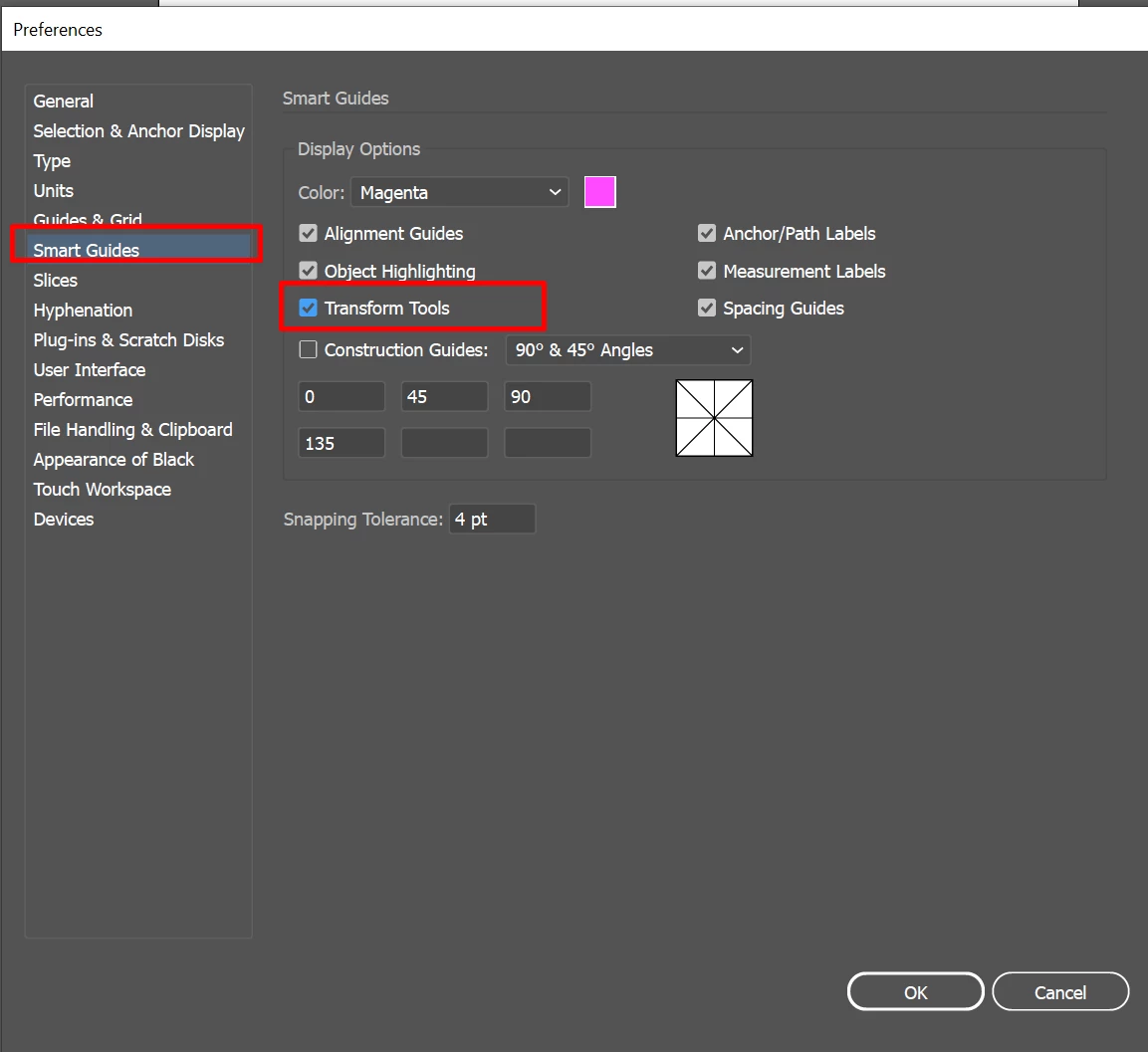
Sorry about the trouble this issue has caused. We are able to reproduce this issue and it is currently under investigation. As a workaround you may try unchecking Transform Tools from Smart Guides preferences (CTRL/ CMD + K > Smart Guides > untick Transform Tools) and share your observations with us:


I would also request that if you could upvote this issue here (https://illustrator.uservoice.com/forums/601447-illustrator-bugs/suggestions/40687171-dragging-objects-with-shift-key-hold-down-broken). This way you'll keep getting all the updates related to this issue.


Regards,

Srishti


20 replies

MarkGould
Participating Frequently
August 15, 2021

Still having this problem with Transform Tools selected in Smart Guides preferences in 25.4.1...

B_C_E_75
B_C_E_75Author
Inspiring
August 4, 2020

I spoke too soon! I just received notification from the CC App that there was a new Illustrator update (24.2.3), and it seems to have fixed the issue! Yes, Transform Tools is on in my Preferences. Thank you, Adobe team!

Participating Frequently
August 4, 2020

Nice! I didn't catch that in the release notes. Glad to hear it. 

Jymnazium
Participating Frequently
August 4, 2020

Turning off Transform Tool in Smart Guide section has remmediated the situation for the moment. 

B_C_E_75
B_C_E_75Author
Inspiring
August 4, 2020

I'm aware of that, thank you. I started this thread on the 16th of June, and we are now in August and have had an update since that didn't address the issue. I'd like to have a full working up-to-date version.

Participant
August 3, 2020

HI, This workaround worked for me. Thanks

B_C_E_75
B_C_E_75Author
Inspiring
July 31, 2020

Is there any timeline as far as when this issue will be addressed? If I understand corectly, the last update did NOT fix this isue? Yes, I can use an older version of Illustrator, but I pay for CC to be able to use the most up-to-date version, and since the most up-to-date version is broken, I feel like I'm not getting my money's worth out of it.

Participating Frequently
July 31, 2020

Well, with how mismatched and inconsistent the Adobe apps are now,  I wouldn't hold your breath on a real fix being implemented any time soon, considering Adobe's track record. It's getting pretty ridiculous.

Kurt Gold
Community Expert
Community Expert
June 19, 2020

Thank you for the clarification, Ton.

Kurt Gold
Community Expert
Community Expert
June 18, 2020

It may be interesting why some participants in this thread claimed that the issue does not exist in their environment.


Just because the Smart Guides settings were "ideal" in that case? Or for some other reasons?


I'm not asking that in order to offend anyone. Just curious.

Ton Frederiks
Community Expert
Community Expert
June 18, 2020

In my case Transform Tools was unchecked, probably a preference inherited from previous versions (I had it off at least since 2017).

Turning it on gives me the problem too.

Srishti Bali
Community Manager
Srishti BaliCommunity ManagerCorrect answer
Community Manager
June 18, 2020

Hi all,


Sorry about the trouble this issue has caused. We are able to reproduce this issue and it is currently under investigation. As a workaround you may try unchecking Transform Tools from Smart Guides preferences (CTRL/ CMD + K > Smart Guides > untick Transform Tools) and share your observations with us:


I would also request that if you could upvote this issue here (https://illustrator.uservoice.com/forums/601447-illustrator-bugs/suggestions/40687171-dragging-objects-with-shift-key-hold-down-broken). This way you'll keep getting all the updates related to this issue.


Regards,

Srishti


DRock22
Inspiring
June 18, 2020

Works for me (as I've mentioned above) on Windows 10. But you do lose some functionality doing it that way. 

Srishti Bali
Community Manager
Community Manager
June 18, 2020

I completely understand that. We are trying hard to fix this as soon as possible.  Please stay tuned for updates, and thanks in advance for your patience.


Participant
June 18, 2020

Updated to v24.2, Shift-drag doesn't move the object, same for alt-shift-drag. The smart guides and their identifiers overlap each other. The previous version worked fine this morning.

Participant
June 18, 2020

Yes. My illustrator v24.2 has the same bug here. Shift-drag simply doesn't move the object and same for alt-shift-drag. Imac 2019, mac os catalina, plenty of ram...

Participant
June 18, 2020

Having the same issue after update.

Catalina 10.15.5 (19F101)

Tried resetting all preferences and also clearing the illustrator support files from by home/library folder. No change.

Seems like a bug. Very irritating!!


Participating Frequently
June 18, 2020

This happens for me, too. It has been for at least the past year, but it seems MUCH worse with the new update. Good to know that disabling smart guides helps, but that's is ridiculous. We should be able to use them both at the same time. Come on, Adobe!