


Copy link to clipboard
Copied
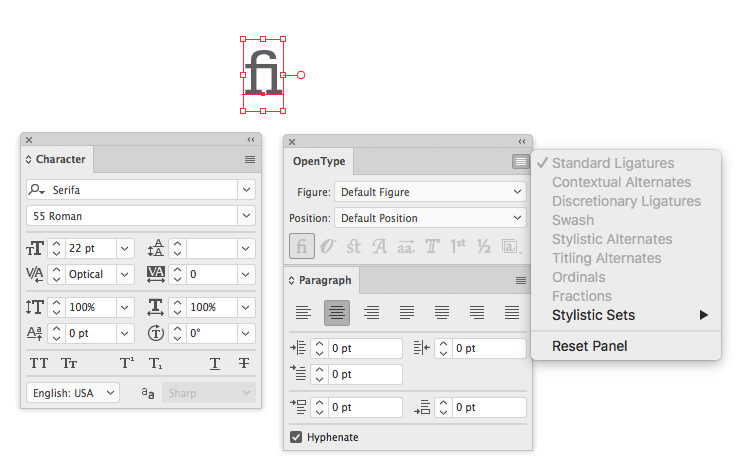
Hi. I'm using Illustrator CC and I can't turn off ligatures - all options are grayed out. See screenshot beow.
Anyone else have this issue or a solution?
(Not sure if it's relevant but I can turn them off in InDesign without issue, only happens in illustrator). Thanks


 3 Correct answers


I don't have the Serifa font, but the ligature setting should work the same on any OpenType font. Click the fi icon in the OpenType panel to turn ligatures on/off.


See above, that's the whole issue, I know how it "should" work - the option is grayed out. (See my screen captures above)
Likely because the font is TTF vs OT. But that still is confounding that the Open Type panel, even when grayed out, turns the kerning pairs on and off as if they were ligatures. The work around I found was choose an actual OT font, turn off ligatures, change back to Serifa TTF and it kept the ligature settings.

I had a similar problem with a font called Lafayette Comic Pro.
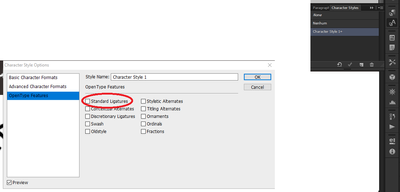
I was able to solve it by going to Window -> Character Styles, making a new style with that font, then in Open Type Features of the Character Style Options window, turning on "Standard ligatures", pressing OK, then editing it, turning them off and pressing OK again.

Explore related tutorials & articles
 19
Replies
19
19
Replies
19


Copy link to clipboard
Copied
Can you select this with the text-tool and then turn off the ligatures in the Open Type Panel?
Copy link to clipboard
Copied
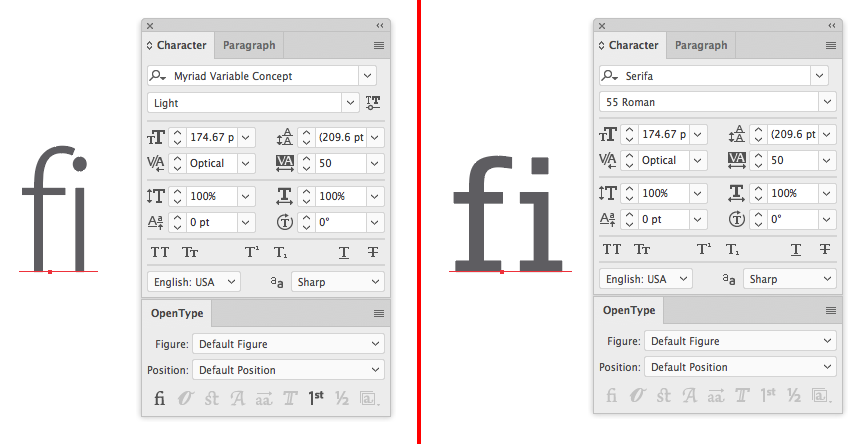
I was not able to, BUT I just changed the font to Myriad, the ligatures options came back. I turned them off. Then switched back to Serifa and the ligatures stayed "off" but still grayed out. See screen shots. This doesn't make any sense to me...
Copy link to clipboard
Copied
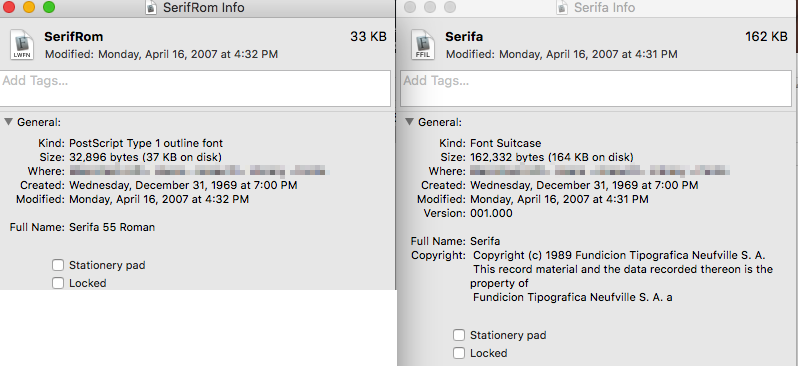
What kind of font is "Serifa"?
Copy link to clipboard
Copied
Copy link to clipboard
Copied
Then of course it won't have OpenType options.
Those fonts have ligatures otherwise embedded. Let me try to remember how that was ... Some had "professional" styles with ligatures and others had it implemented through specific glyphs you needed to type. Try and search the keyboard layout.
Copy link to clipboard
Copied
That's interesting and makes sense. 
However, I'm kind of confused that the ligatures appear based on the last used Open Type settings as I did with the Myriad font. Not sure how else to turn them on and off since they seem to be appearing as kerning pairs when I type them? (see first screen shot of "fi").
This "work around" I found seems really non-intuitive. 
Copy link to clipboard
Copied
You are using a PostScript font. These are so old, I'm astonished that Mac OS still supports it.
Copy link to clipboard
Copied
I don't have the Serifa font, but the ligature setting should work the same on any OpenType font. Click the fi icon in the OpenType panel to turn ligatures on/off.

Copy link to clipboard
Copied
See above, that's the whole issue, I know how it "should" work - the option is grayed out. (See my screen captures above)
Likely because the font is TTF vs OT. But that still is confounding that the Open Type panel, even when grayed out, turns the kerning pairs on and off as if they were ligatures. The work around I found was choose an actual OT font, turn off ligatures, change back to Serifa TTF and it kept the ligature settings.

Copy link to clipboard
Copied
How do I turn ligatures off in Premiere?
Copy link to clipboard
Copied
You might want to ask in the Premiere forum.
https://community.adobe.com/t5/premiere-pro/bd-p/premiere-pro?page=1&sort=latest_replies&filter=all
Copy link to clipboard
Copied
I had a similar problem with a font called Lafayette Comic Pro.
I was able to solve it by going to Window -> Character Styles, making a new style with that font, then in Open Type Features of the Character Style Options window, turning on "Standard ligatures", pressing OK, then editing it, turning them off and pressing OK again.

Copy link to clipboard
Copied
None of the above worked for Georgia Bold (TTF) on Mac. All the options worked for Myriad Pro. But as soon as I change it back to Georgia, I have the same issue.
I activated the Adobe Georgia font family and the ligature option became availble but did nothing.
COME ON ADOBE! Please fix. This is wasting serious time. The ligatures should not be the default. Allow us to turn it on when needed.
A good bit of my work is interpretives for kids. Some challenged. And I am stuck with some fonts since they are part of the brand established before me.
Looking forward to the fix. Thanks.
Copy link to clipboard
Copied
Please post screenshots.
Copy link to clipboard
Copied
Copy link to clipboard
Copied
I actually got it to work by making Garamond bold > turning off ligatures > kerning where needed > then making it Adobe Georgia Pro bold. Whew. A lot of steps for such a little thing.
Copy link to clipboard
Copied
Adobe Georgia Pro bold certainly is an OpenType font. And initially you had a TrueType font, which can't have OpenType features (that's why they are called OpenType features)
Ligatures in PostScript and True type fonts were included in different ways.
Copy link to clipboard
Copied
Copy link to clipboard
Copied
You can set up what is the default type format. Just edit the Default character style and the default paragraph style in the respective panels. Then save the AI file as a new document profile or a template file.
You can also set up your swatches in that template.


Find more inspiration, events, and resources on the new Adobe Community
Explore Now
 AdChoices


