
Inspiring
March 28, 2019
Question

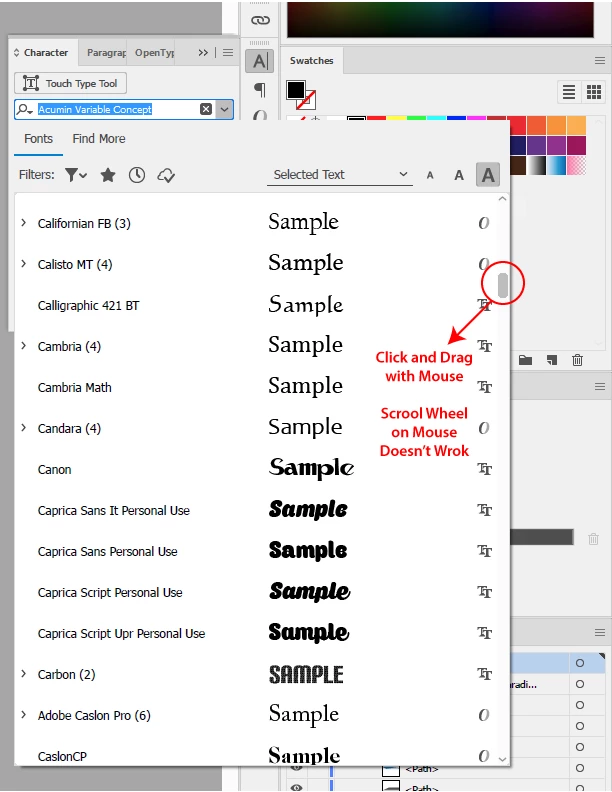
Unable to use scroll wheel on font selection Illustrator CC

  • March 28, 2019
  • 1 reply
  • 1121 views

I am having a weird problem of not able to use scroll wheel to move through font selections, I have to use the mouse to click and drag the scroll tab to move through the fonts. (My mouse scroll wheel is working for all other adobe software font scrolling, this only happen in illustrator)

I have same version of illustrator CC installed on both my home and office computer, my home illustrator can move through fonts with mouse scroll wheel, but not for the office computer.  Is there a setting I accidentally clicked off?
    This topic has been closed for replies.

    1 reply

    Monika Gause
    Community Expert
    Community Expert
    April 15, 2019

    Is it the same system?

    Does it stop on the same fonts? or different ones?

    JamesHHLAuthor
    Inspiring
    April 16, 2019

    Yes both PC using Win7 with same adobe CC account.  It doesn't scroll with mouse at all, so it stops at first font basically. to go through fonts, I have to use the mouse to click and drag the side bar.  But home computer can scroll with mouse just fine.

    note: This only happen for illustrator..... Photoshop, InDesign etc scroll wheel work just fine with fonts on same computer.

    Monika Gause
    Community Expert
    Community Expert
    April 16, 2019

    Which font is that?