

Chris  P.  Bacon
Inspiring
December 27, 2022
Question

Unexpected paths appear when outlining stroke
  • December 27, 2022
  • 1 reply
  • 550 views

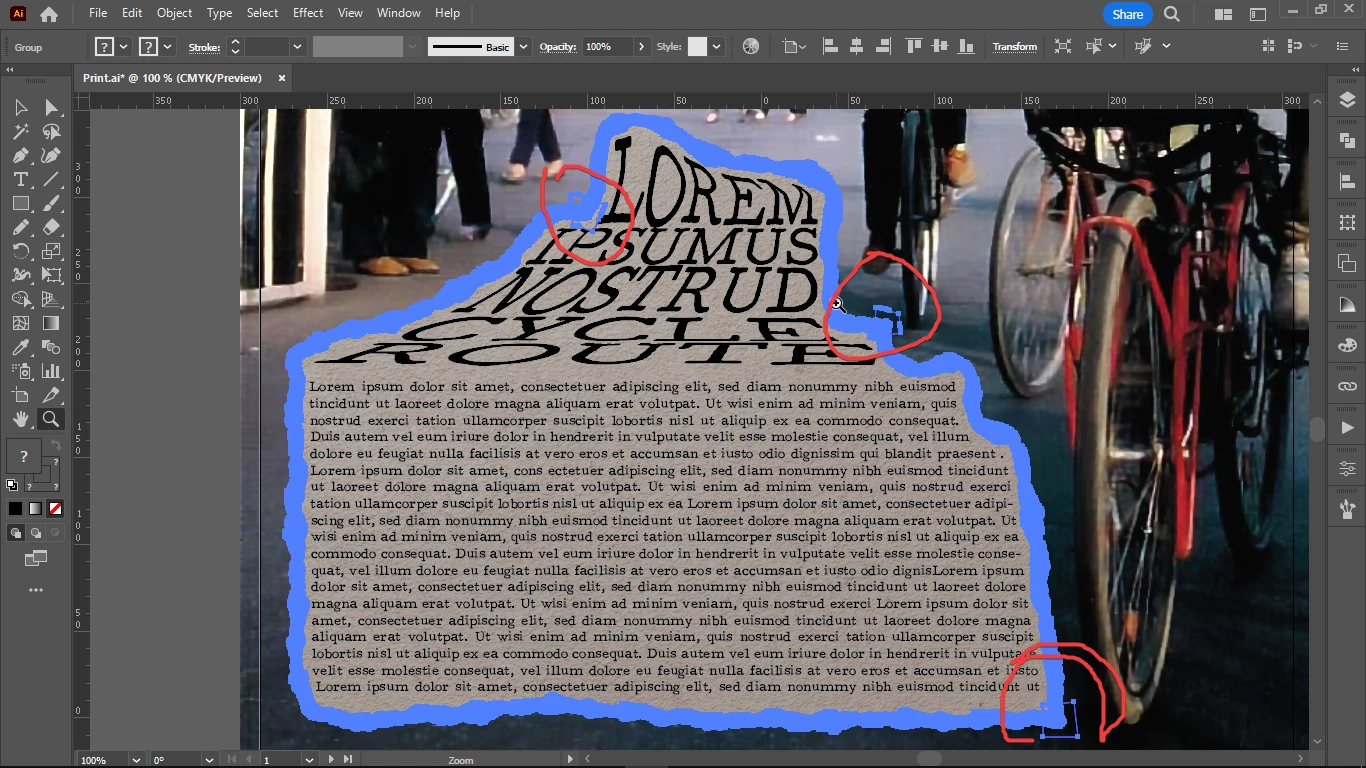
Now I want to replace my white torn paper stroke with an other image texture, so I outlined the stroke and I got these weird paths around anchor points.

Should I do something about them?

Why are they there and how do I remove them?

They seem to be due to my text boxes that were used for my subhead with Envelope Distort.

This topic has been closed for replies.

1 reply

Monika Gause
Community Expert
Community Expert
December 27, 2022

If you could share the AI file (before outlining stroke) someone could likely tell you where they are coming from. With torn paper structure this can happen. Some small and close to invisible elements, something like that.

Chris  P.  Bacon
Inspiring
December 27, 2022

the file

Monika Gause
Community Expert
Community Expert
December 27, 2022

Thank you.


That torn paper brush is a pattern brush and those rectangle paths are in the base artwork of that brush. In a pattern brush you always need an invisible rectangle to define the elements, but in that base artwork, there are 2 rectangles stacked. One of them is not needed for the brush and therefore becomes visible after expanding. You could edit that base artwork and re-create  the brush if it irritates you.