
Participant
October 9, 2019
Answered

Unknown Error Has Occurred (25,700) - Closes Illustrator during startup

  • October 9, 2019
  • 7 replies
  • 11840 views

I have had AI for many years now, but suddenly this morning I get this message when trying to open-up AI, which I need for my business. I have tried uninstalling and reinstalling. I have tried system restore. Nothing. Please help. 
    Correct answer Rishabh_Tiwari

    Hi Tracy,


    Sorry to hear about the trouble you are facing with Illustrator while launching it. In addition to the information asked by Monika, I would request if you can share a few more details like: 


    1. Do you have a default printer set? If not, please set it as Adobe PDF and please launch Illustrator and see if it works.
    2. Screenshot of the error.
    3. Does it generate any crash report? If yes, please submit the crash report by following these steps: https://helpx.adobe.com/in/illustrator/kb/crash-next-steps.html
    4. When did this start happening? Are there any recent changes made to your system? For example, any antivirus, system updates or web extensions installed recently.
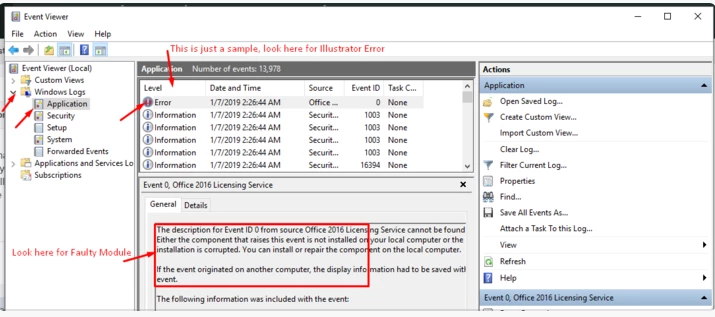
    5. If you are using Windows, please share the Event Viewer Logs, please refer to the screenshot below:


    Looking forward for your response.


    Regards

    Rishabh

    7 replies

    Participant
    August 20, 2022

    Hello, I am having this same issue. I recently installed a new printer but I have set Adobe PDF to default and the error still occurs. I have tried setting multiple printers to default and still get the error. I have uninstalled and reinstalled 3-4 times and even installed an earlier version of illustrator and nothing is helping. Can anyone please assist. I can not work until this is resolved.

    Participant
    February 9, 2023

    I'm having the same error, did you know how to fix it? I don't know what I have to do

    Community Manager
    February 9, 2023

    Hello @daniel28267815pz0y,


    We understand how frustrating it can be to experience crashes. If you're using a Wacom Tablet, we recommend trying an older version of the driver (6.3.46-2) to see if it resolves the issue.
    If not, please follow the steps in this help article (
    https://helpx.adobe.com/illustrator/kb/fix-crash-on-launch-issues.html) and let us know your observations. Also, kindly share the crash report using the steps in this article (https://helpx.adobe.com/illustrator/kb/crash-next-steps.html) and use the same email account as your community account for quick tracking. We appreciate your time and efforts in resolving this issue.


    Looking forward to your response.


    Thanks,

    Anubhav

    Participant
    February 5, 2022

    Oh Yes. Same problem here. I go to open Illustrator from Creative Cloud and receive this notice.
    'An unknown error has occurred (25,700)"
    I have recently installed a new printer, and that printer is the default.
    What am I to do please?

    Annamundun
    Participant
    November 4, 2020

    Hello,


    Since this morning, my Illustrator runs into this error too. I've tried all the previous things, like setting my default printer to Adobe PDF, resetting prefs manually, but it does not help. I've deleted my version (25.0) and tried to run the previous one (24.3), which still works fine. Updating that version again does not help either. What should I try to fix it?

    Annamundun
    Participant
    November 9, 2020

    I've fixed it! What I did was remove all folders related to Illustrator 2021 (in %appdata%, program files etc.) and after that, fresh installation of version 25. I did make sure to back up all my folders and preferences, but since I could update from my already installed version 24.3 that proved unnecessary. I hope this helps someone!

    Participant
    September 14, 2020

    I have a printer set on default already and the article was not helpful. How am I suppose to change the preference if I cant get the app to open? 

    Participant
    September 14, 2020

    nvm I got it working thanks


    Participant
    October 24, 2020

    How did you fix it? Please tell me I've been facing the same problem since two days. My illustrator won't open and I have no clue how to check if printer is set on default or not.

    Participant
    June 10, 2020

    So what was the fix?

    I'm having this problem and I don't see any procedure to follow to correct the issue short of setting default printer to Adobe PDF - I do not have that as a printer choice so is there any other information about things we might try?  It used to work just fine and then yesterday it comes up with this error when you launch it and it just quits.

    Ashutosh_Mishra
    Inspiring
    June 11, 2020

    Hi there,


    Sorry to hear about your experience. Would you mind sharing version of OS & Illustrator? You may also try resetting the preferences. Please follow this help article and let us know how it goes.

    **Please note that resetting preferences will remove all the custom settings and Illustrator will launch with default settings. You can also take a backup of the folders in case you want to. Location is mentioned in the article. 


    Regards,

    Ashutosh

    Known Participant
    October 27, 2023

    Just wanted to add that deleting preferences fixed my case of this same problem.


    Yesterday, 2 hours after I quit the program, did some other work, then went back into Illustrator I got this vague message (see attachment). I could not open any previous project or create any new ones, even after a reboot.


    Today I used the keyboard shortcut (from the linked page above) as I launched Illustrator and I was able to open and create files again.


    Thanks for a quick and painless fix. Hope this helps someone in the future

    Rishabh_Tiwari
    Community Manager
    Rishabh_TiwariCommunity ManagerCorrect answer
    Community Manager
    October 9, 2019

    Hi Tracy,


    Sorry to hear about the trouble you are facing with Illustrator while launching it. In addition to the information asked by Monika, I would request if you can share a few more details like: 


    1. Do you have a default printer set? If not, please set it as Adobe PDF and please launch Illustrator and see if it works.
    2. Screenshot of the error.
    3. Does it generate any crash report? If yes, please submit the crash report by following these steps: https://helpx.adobe.com/in/illustrator/kb/crash-next-steps.html
    4. When did this start happening? Are there any recent changes made to your system? For example, any antivirus, system updates or web extensions installed recently.
    5. If you are using Windows, please share the Event Viewer Logs, please refer to the screenshot below:


    Looking forward for your response.


    Regards

    Rishabh

    Participant
    October 9, 2019
    Rishabh - This fixed it! Thank you so much! Somehow my printers were all deleted after the last MS Update.
    Rishabh_Tiwari
    Community Manager
    Community Manager
    October 9, 2019
    Glad to hear it has been resolved! Feel free to reach out if you need any help in the future. Thanks! 
    Monika Gause
    Community Expert
    Community Expert
    October 9, 2019

    Which version? Which system?

    Participant
    September 19, 2023

    Latest version and Windows 10


    Anshul_Saini
    Community Manager
    Community Manager
    September 20, 2023

    Hi @michael_SGSG,


    I'm sorry to hear that you're experiencing the "Unknown Error Has Occurred (25,700)" issue despite trying the suggested solution. This error can be quite frustrating, and we'll do our best to assist you.


    It seems that Tracy resolved a similar issue by setting the default printer to Adobe PDF. This can sometimes resolve the "Unknown Error Has Occurred (25,700)" problem during Illustrator startup. Here are the steps to do that: https://helpx.adobe.com/illustrator/kb/troubleshoot-printer-issues.html


    To further investigate and resolve the problem, we'll need some additional information:

    • Please provide the specific version of Adobe Illustrator that you have installed.

    • Share your Windows 10 build number.

    • Have you made any recent changes or updates to your system, such as installing new software, system updates, or driver updates? Please provide details, if any.

    Once we have this information, we can offer more targeted solutions to help you resolve the issue and get Illustrator working as expected.


    Best,

    Anshul Saini