
Participant
January 2, 2020
Question

Unwanted pixels with blend tool

  • January 2, 2020
  • 3 replies
  • 1003 views

Hey, I'm fairly new to adobe, so this might be an easy fix for some, but I can't for the life of me figure this out.


I am making this stacked, blended, wavy text vector in illustrator, and after using the blend tool and outlining and coloring the illustration I get this gray pixel "shadow" (pictured below), even though my outline is completely black. Is this just the quality of my monitor being the issue, or would this show up in print? And if so, how can I fix it?
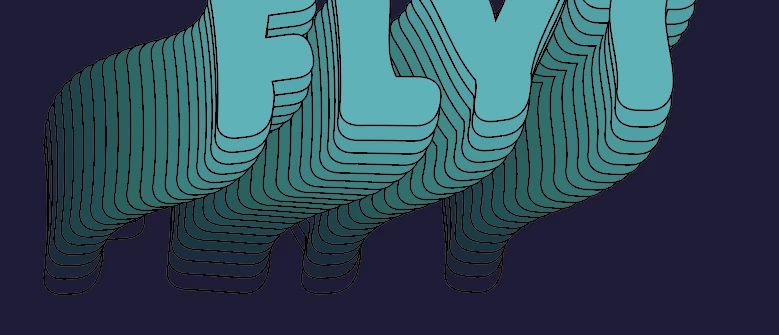
 

Thanks in advance!

This topic has been closed for replies.

3 replies

chanaart
Community Expert
Community Expert
January 3, 2020

I will also make sure that the output for raster effects will be 300 ppi.

Monika Gause
Community Expert
Community Expert
January 3, 2020

The raster effects resolution won't have an impact here.


What can change it is either the document color mode RGB or a rich black.

But in offset printing this shouldn't matter anyway. It will be an issue when exporting to pixels or with printing processes that send pixels.

Monika Gause
Community Expert
Community Expert
January 2, 2020

THat's probably the rendering issue with 100 K black in CMYK color mode.

Do you need to output it as a raster graphic? Or will you just print it? Printing should work well.

Bill Silbert
Community Expert
Community Expert
January 2, 2020

Try turning off GPU Performance in the Performance section of Illustrator's preferences.