Hi, though the question is from years ago, I'll still post it because this WORKED FOR ME and people might have the same issue:
I've searched on Windows10 for "Graphics Settings". From the Graphics Settings' menu, I chose the voice "classic app" and then browsed for illustrator.exe in my PC; selected it and then I saw it in pop in the Graphics Setting menu. Clicked on it > option> Hight performance.
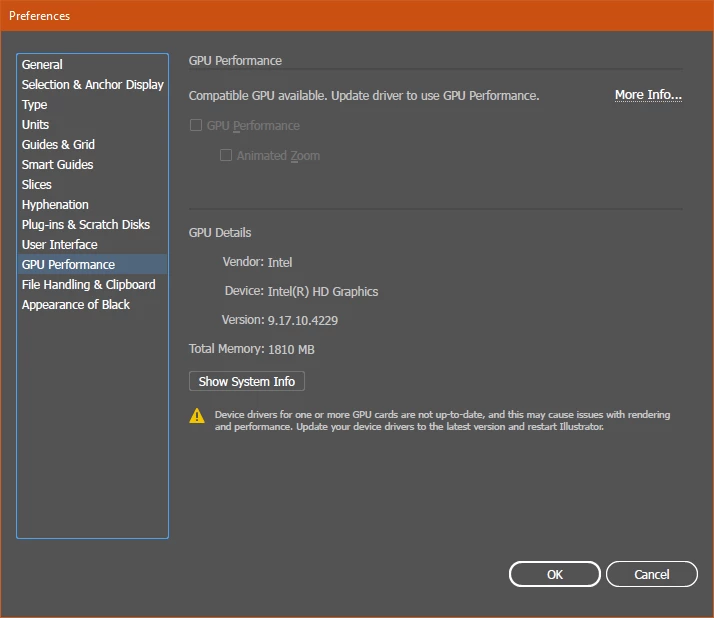
Started Illustrator and went to the preferences Menu to change the Performance settings & activate "GPU Performance".
---
Things I did before, that did not work, but were standard procedure for this "problem solving":
I've searched for my GRAPHIC CARD's name. I have a dedicated one and to find it's model's name I used a program I downloaded back when I had to buy new ram for the computer. The program analyses the hardware on the PC and then show you all the details for different categoryes. (It does not need to install anything, just download & run it) It's called Speccy64.
THEN I've INSTALLED THE DRIVES from the graphic's card manufacturer site by searching the model on google.
After restarting the computer and opening illustrator, that still did not work.
I went to the graphic card driver's software I just downloaded and manually set High Performances for illustrator from their menu. Most of this kind of manufacturer's software should give you this capability.
Still, opening illustrator and going to preferences, it did not see my Graphic card. It's then that I've searched for "graphics setting" in Windows & found the menu I've thought you before. 
Hope this could be useful to somebody, like the post in case! bye


 AdChoices