Copy link to clipboard
Copied

Hello.
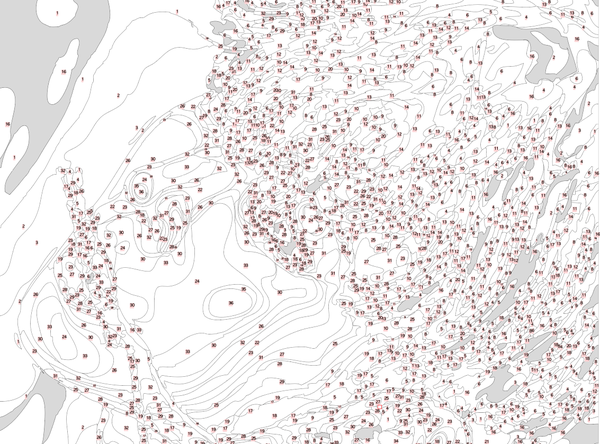
I want to convert jpg to vector like above image.
Now i have call expandTracing, but how can i use script to group these path by filled color and labeled by group number?
Hi, Here is the thread where i found your question and it answers. You can check that and check your answer there.
Script. Insert text number in the middle of visible bounds of the each object
Thanks.
Copy link to clipboard
Copied
Hi, Check this out. I found this thread may be it will help you.
Need script to batch convert vector .eps to .png images with scale
Thanks.
Copy link to clipboard
Copied
Thank you, but how to add text in path?
Copy link to clipboard
Copied
Hi, If you want to add text in the path then create a path and select the type on a path tool from the text tool and then click on a path and type your text.

Or check this video guide to do it.
Copy link to clipboard
Copied

No, after image tracing and expand, there are many circle like this , how to use script to add text in this?
Copy link to clipboard
Copied
To add pathtext on existing paths with script:
For an example:
// draw a line
// and select this line
var aDoc = app.activeDocument;
var pTxt = aDoc.textFrames.pathText( aDoc.selection[0]);
pTxt.textRange.characterAttributes.size = 20;
pTxt.contents = """I'm text on a path""";
If this is what you want - have fun
![]()
------------------------------------------------------------------
Should this thread moved to Illustrator Scripting ?

Copy link to clipboard
Copied
Hi, Here is the thread where i found your question and it answers. You can check that and check your answer there.
Script. Insert text number in the middle of visible bounds of the each object
Thanks.
Get ready! An upgraded Adobe Community experience is coming in January.
Learn more