
Copy link to clipboard
Copied
Hello there! Thank you for listening.
I'm a Photoshop user integrating into Illustrator because of its far greater vector tools compared to Photoshop.
I discovered variable width profile which is AMAZING when doing lineart. I'm doing this Gorilla character which needs to be in multiple parts for animation.
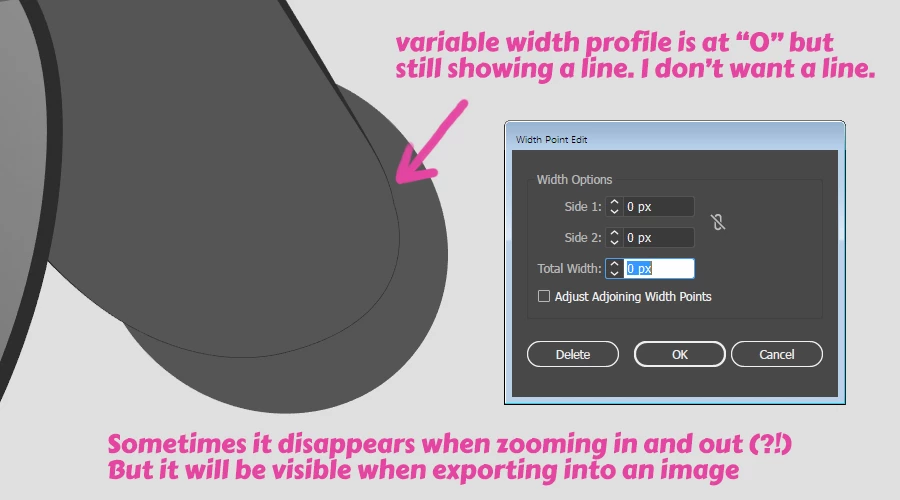
But I ran into trouble when I discovered it's not possible to hide part of the stroke with the width tool even though I set it to 0 pixels.
Is it possible at all to get rid of the small line or is it permanent that it cannot be hidden and I have to approach this way of creating shapes with lineart in another way?
Making the stroke disappear at certain parts would be awesome when doing characters for animation. 😄
Copy link to clipboard
Copied
Interesting use of width profiles. I never thought of that.
You might try art brushes for that.
But unfortunately art brushes are not as flexible as width profiles, so you would need a variety of art brushes with different settings of gaps.
Or maybe set up dashes on your strokes. But then again they would need some further fiddling with the settings.
Copy link to clipboard
Copied
Hello!
Thank you for your reply and sorry for my late answer.
After fiddling around with strokes, dashes and gaps I managed to somehow get what I wanted.
Here is 1 dash and 1 gap. I had dash value at 500px and gap value at 50px. I think it has to do with the length of the stroke around the shape. Anyways, the other end of the stroke was fat so I Width Tool'd it down, but it frequently produced some very thin annoying lines, but I tried to work it out to remove them. My inexperience with how Illustrator works affects everything I do here ![]()

I am not sure if this efficient to make in the long run but I'll try it for some project because I haven't found any other efficient way to do it.
I like the fact that the stroke is part of the shape and not a external shape. So when you work with the shape, the stroke always follows it.
I like how in this way, the shape is retained and no cut needs to be done like shown below here:

I decreased the opacity of the object on the right. These lines taper really nicely when they're both 100% opacity but the cut part isn't so elegant ![]()
But yes, thanks for everybody's reply. This might be the closest, non-hassle way to make this happen (?)
Copy link to clipboard
Copied
Thank you for your detailed instruction and the added screenshots. I'm sure this will help others.
Copy link to clipboard
Copied
Expand and use the eraser tool.
Left: 3 of 4 total points set to 0 point, a hairline still shows.
Right: After Expand & Eraser tool.

Copy link to clipboard
Copied
Hello!
It does work, except it is not attached to the shape after expanding which isn't as convenient compared to if width tool could actually set the line to 0 to make it invisible. So if I make changes to the shape, I need to fiddle with the outline as well ![]()
Copy link to clipboard
Copied
Would be best if the variable width tool worked perfectly, but unfortuanately whether you enter the values or manually or use the tool, 0 thickness variable width lines often need some cleanup.
Copy link to clipboard
Copied
I ran into this exact same problem today when trying to use the variable width tool to remove outlines on the joint sections of a 2D character for an animation. It seems when you set the line width to zero, it never truly disappears. There is ALWAYS a thin hairline present. (I also tried setting it to .001 px). Has anyone discovered a work-around for this issue?
Copy link to clipboard
Copied
https://forums.adobe.com/people/Jerry+Witt schrieb
I ran into this exact same problem today when trying to use the variable width tool to remove outlines on the joint sections of a 2D character for an animation. It seems when you set the line width to zero, it never truly disappears. There is ALWAYS a thin hairline present. (I also tried setting it to .001 px). Has anyone discovered a work-around for this issue?
As I already wrote in this thread: try dashed strokes. Adjust the length of the dashes until they fit.
Copy link to clipboard
Copied
I agree. It's a great use of profiles - but the problem you're encountering is that no matter how you look at it, it's still a stroke - so the line'd still generally show, if attached to any broader area (unlike when we just set regular strokes to zero).
As for the showing or hiding on zoom, I think you're just seeing a function of the response of your graphics card - it's still there, but the monitor's just not going to show it at certain zoom levels.
One thing I'd try would be to create the stroke as a separate item, with no fill. Then, perhaps use the knife or scissors to cut the path at whatever point you wanted. You could shorten either path and use either a brush with thin ends, or the profile with thin ends to make it have that gap, and still have your graceful taper on the stroke.
Copy link to clipboard
Copied
Hey, one more work around for this problem would be setting your variable width line outside the shape and add another thin line (of background colour) on the top of it, so it goes where you want to hide that unwanted stroke
Copy link to clipboard
Copied
BUMP. WHY doesn't the line appear invisible if it's 0?? This makes this function basically useless for me. So workarounds it is 😕
Copy link to clipboard
Copied
In PostScript and PDF a line width of zero is possible: It is interpreted as the thinnest line that can be rendered at device resolution—in other words, one device pixel wide.
With a normal line, Illustrator sets the line color to None when you enter a 0 line width, but with a variable stroke it cannot do that, it would make the entire stroke invisible.
That would explain the tiny line you see when you make a variable stroke 0 pts wide, it will be rendered as one device pixel and that stroke does not become bigger when you zoom in.
Copy link to clipboard
Copied
At least in some circumstances the zero stroke width line can be masked by applying a gradient along the path in appropriate colors.

Peter
Copy link to clipboard
Copied
tromboniator wrote
At least in some circumstances the zero stroke width line can be masked by applying a gradient along the path in appropriate colors.
Or a 0% opacity.

Copy link to clipboard
Copied
A broad interpretation of "appropriate colors" might include 0% opacity, but I'll admit that I hadn't gotten there yet!
Copy link to clipboard
Copied
I did not get there until I saw your gradient suggestion ![]()
Copy link to clipboard
Copied
What a team!
Get ready! An upgraded Adobe Community experience is coming in January.
Learn more