Exit
  • Global community
    • Language:
      • Deutsch
      • English
      • Español
      • Français
      • Português
  • 日本語コミュニティ
  • 한국 커뮤니티
0

Vertical Shear Effect

Engaged ,
Feb 02, 2017 Feb 02, 2017

Hi

I'm try to shear an object (it's the ribbon in the photo below). When I select horizontal in the options panel, i can shear it to the angle selected, when I select vertical (which is the shear effect I want), nothing happens, nada, zilch. 

I would like it so the bottom left of the ribbon stays in position, but the right hand side is raised slightly on the vertical axis. Whatever value I put in nothing happens?

Am I missing something here? 

Thanks,
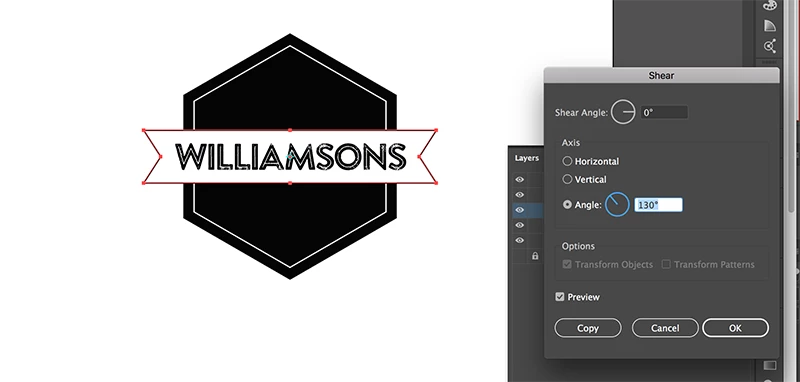
sheartool.png

Paul.

1.4K
Translate
Report
Community guidelines
Be kind and respectful, give credit to the original source of content, and search for duplicates before posting. Learn more
community guidelines

correct answers 1 Correct answer

Community Expert , Feb 02, 2017 Feb 02, 2017

Does it work if you Alt click the lower left corner with the Shear tool?

shear.png

Translate
Adobe
Community Expert ,
Feb 02, 2017 Feb 02, 2017

Does it work if you Alt click the lower left corner with the Shear tool?

shear.png

Translate
Report
Community guidelines
Be kind and respectful, give credit to the original source of content, and search for duplicates before posting. Learn more
community guidelines
Engaged ,
Feb 02, 2017 Feb 02, 2017

No.

Do you mean use the white arrow tool and click the anchor point and then use the shear tool?

Translate
Report
Community guidelines
Be kind and respectful, give credit to the original source of content, and search for duplicates before posting. Learn more
community guidelines
Community Expert ,
Feb 02, 2017 Feb 02, 2017

No, select the Shear Tool and Alt Click the lower right corner.

Edit: lower Left corner point

Translate
Report
Community guidelines
Be kind and respectful, give credit to the original source of content, and search for duplicates before posting. Learn more
community guidelines
Engaged ,
Feb 02, 2017 Feb 02, 2017
LATEST

Hi Ton,

It's working now for some reason, when I do both.  I actually logged in and out again of my mac because it crashed and it works now both using your method, and selecting the object and double clicking the shear tool and punching in the values which is what I was originally doing.

It was good to learn the extra option thought with the alt key.

Thanks for your help

Paul.

Translate
Report
Community guidelines
Be kind and respectful, give credit to the original source of content, and search for duplicates before posting. Learn more
community guidelines