
Weird stroke on shapes
I'm new to illustrator, but I have limited experience with photoshop. I originally made a small crescent moon shape in illustrator, and then moved it into photoshop as smart objects. Whenever I edit the smart object in illustrator, the stroke changes and gets this strange distortion. But when I save the smart object, the appearance doesn't change in photoshop. This is what the shape looks like in photoshop.

This is what the shape looks like in illustrator.
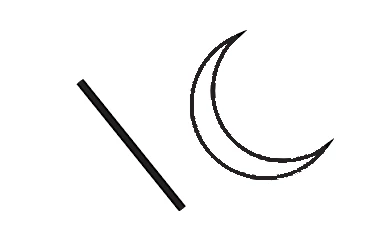
When I first made the shape, the stroke was fine, but now all new shapes in illustrator have this distortion. So far though, it is only the shapes that are affected. As you can see in the illustrator image, the stroke created with the line tool looks normal. If I change the stroke definition on the shape, the stroke will change, but it will still have the distortion. I must have accidentally changed the settings somehow, because not all strokes are affected. Any help with this would be deeply appreciated.
 AdChoices