
_Crockett_
Known Participant
March 20, 2019
Question

What is the last good version of Illustrator CC?

  • March 20, 2019
  • 3 replies
  • 9445 views

I understand this will be particular to my installation, but I am having the problem described in previous questions like Flickering cursor + menus won't open in Illustrator & Photoshop CC 2018​ and others. I do not have admin rights and am tired of waiting in line with IT to get someone to delete icudtl.dat or other files Every.Blinking.Update. What is the last version of Illustrator that actually worked without flickering cursors and unselectable menu items? I'd like to get it installed and request to get off the update cycles. I just need Illustrator to work reliably.

Here is what I have available:
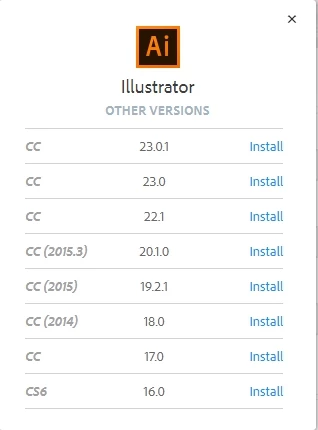
    This topic has been closed for replies.

    3 replies

    Mike_Gondek10189183
    Community Expert
    Community Expert
    March 21, 2019

    If you want to get rid of the flickering cursor, I recommend you look into what is causing that. Most installations do not have this issue, so there must be something unique about your system software or hardware. These types of issues flcikering menus & cursors most often occur on windows, and can be a data tracker like web companion, spy sherriff, or a graphics card issue.

    _Crockett_
    Known Participant
    March 21, 2019

    Good point, but my system is completely IT-controlled. There are trackers installed, but all corporate-mandated. My computer is new as of last year, but not top-of-the-line. Unfortunately, that is completely budget controlled, and the situation won't be changing soon.

    I know my situation is in the very small minority, otherwise these forums would be blowing up with angry people. I just want to open Illustrator and do my work and would rather work reliably with less features than have to wait for IT to fix something.

    Mike_Gondek10189183
    Community Expert
    Community Expert
    March 21, 2019

    Did this start after a certain date or action?

    Assuming you are on windows

    1. Remove or update any OS or Adobe app  plugins including wacom tablet installed?
    2. Do a system restore prior to when this was happening, those automatic restore points often do not work unless you manually created one
    3. Check your installed apps. Google anything you do not recognize, and remove if applicable
    4. Reset the cookies in all your browsers, is under the privacy tab on most browsers. Make sure you know your logins before doing.
    rcraighead
    Legend
    March 21, 2019

    I still do my creative work on AI CS5 because from CS6 on a multi-stroke selection is not maintained while refining stroke lines with Pencil Tool.

    Mylenium
    Legend
    March 21, 2019

    Likely you would have to go back to CC 2014 if that's really such a big concern. CC 2015 started all this GPU-accelerated nonsense and ever since clearly nobody ever got a handle on it...

    Mylenium