

jctremblay
Community Expert
Community Expert
December 29, 2009
Answered

What the key equivalent to ~ in UK keyboard

  • December 29, 2009
  • 7 replies
  • 71515 views

A friend is unable to find the equivalent of the tilde key (~) on his UK keyboard to transform patterns but not objects when using a transform tool by holding down the tilde key (~) while dragging. Does this capabilities is available for UK?
    This topic has been closed for replies.
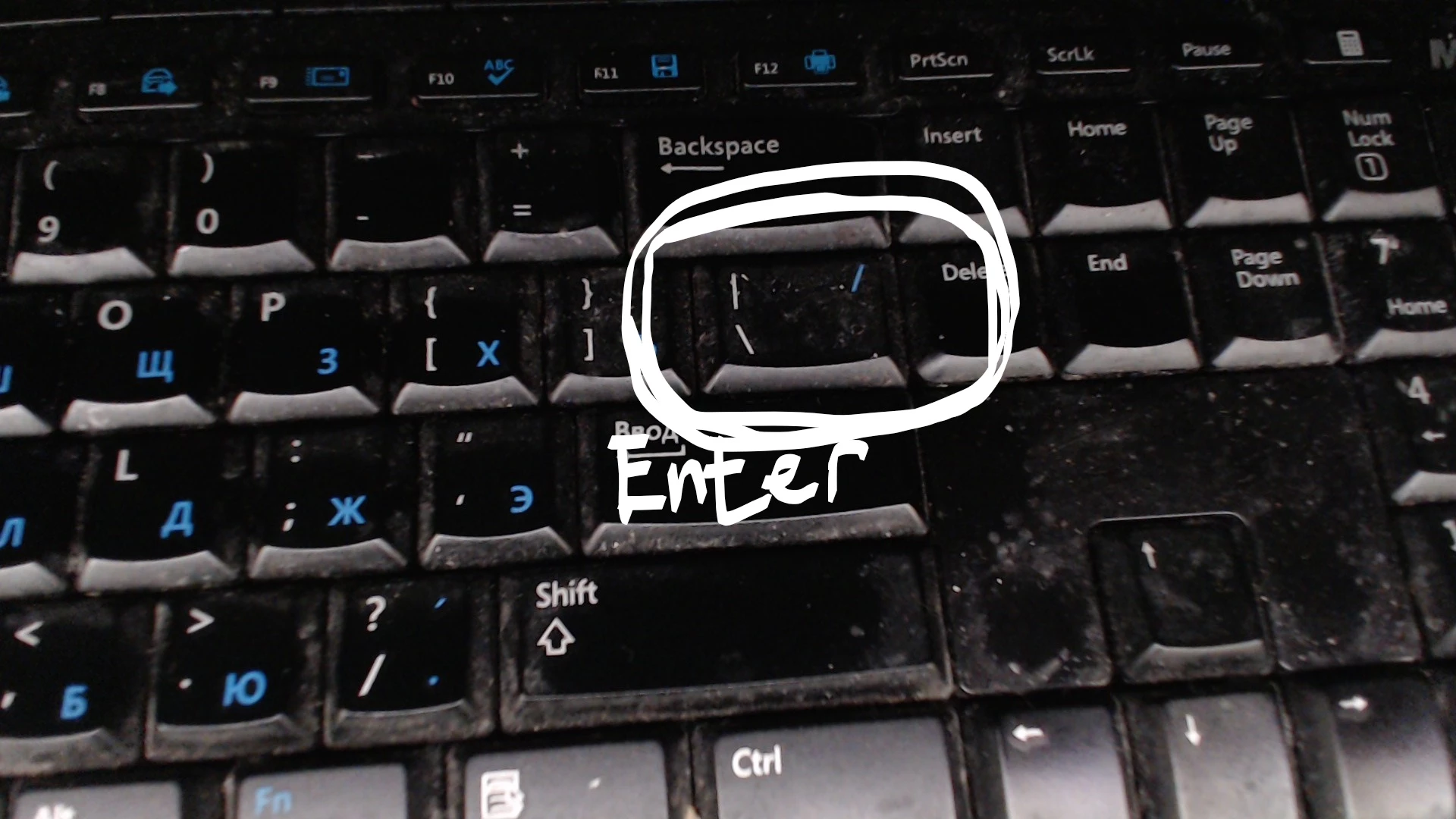
    Correct answer inyazserg

    This is the button which I use for tildas (it has these symbols \ /):

    7 replies

    inyazsergCorrect answer
    Participant
    December 4, 2018

    This is the button which I use for tildas (it has these symbols \ /):

    Participant
    April 20, 2018

    I was able to get the tilde (squiggly or twiddle) character on a UK QWERTY keyboard by using a combination of SHIFT + Back Slash (above Enter) keys.

    See attached screenshot below:

    tromboniator
    Community Expert
    Community Expert
    April 20, 2018

    If you read the OP, you'll see that the question was not how to type a tilde; rather it's what key to press to transform a pattern without transforming its enclosing path.

    Participant
    November 30, 2017

    Use @

    Participant
    May 25, 2013

    In CS6, it's the apostrophe key, below the @ symbol ( ' )

    Steve Fairbairn
    Inspiring
    March 22, 2013

    My Icelandic Mac keyboard doesn’t have a tilde-key.

    But I use the <-key (to the left of Z) to manually manipulate patterns.

    Use it in conjunction with Scale and Rotate tools as well as just on its own for dragging patterns.

    Participant
    March 22, 2013

    Got the same prob did you find out how to do this on a uk keyboard???

    Jacob Bugge
    Community Expert
    Community Expert
    March 22, 2013

    Red,

    It should be over by the Enter key, with the #.

    http://en.wikipedia.org/wiki/UK_keyboard#United_Kingdom

    Ultimately, the general way of finding out how to get it to work on whichever keyboard you have is to try all keys with/without shift (and AltGr), and remember or write it down.

    With so many languages/countries and Win/Mac there are so many (im)possibilities, and no one has ever made any list of just a few.

    I remember that the German keyboards use the < like the Icelandic, as Monika should be able to confirm.

    Participant
    April 24, 2013

    Hi Jacob

    You are right it is the # next to the enter but the problem is that you have to use the shift key with it and illustrator use the shift key to do other things and i cant find anywhere in the setting to change the ~ to a diffent key in illustrator.

    Participating Frequently
    December 29, 2009

    Maybe it depends exactly what keyboard he is using.

    On my Mac keyboard (UK English) the tilde ~ is on the key to the left of the letter 'Z'.

    But you need to use 'Shift' with it to get the character to appear.

    jctremblay
    Community Expert
    Community Expert
    December 29, 2009

    Ok, but how can you use it to transform the pattern only on a selected object? Or which key are you holding down to accomplish that?

    Participating Frequently
    December 29, 2009

    Works for me by using the tilde key on the pattern itself.

    Or

    Is  your friend using the "Transform" menu at the top of the screen?

    Object > Transform > Scale > ....has he then ticked "Patterns" and not "Objects"