
Participant
January 23, 2020
Answered

what this shortcut for this tool ?

  • January 23, 2020
  • 2 replies
  • 324 views


i usually use this tool to select some object that inside another object

but i don't know the tool's name an the shortcut that to switch it...

usually i just click it but it more better if i can use shortcut to swith it...


sorry for my bad english...
This topic has been closed for replies.
Correct answer Doug A Roberts

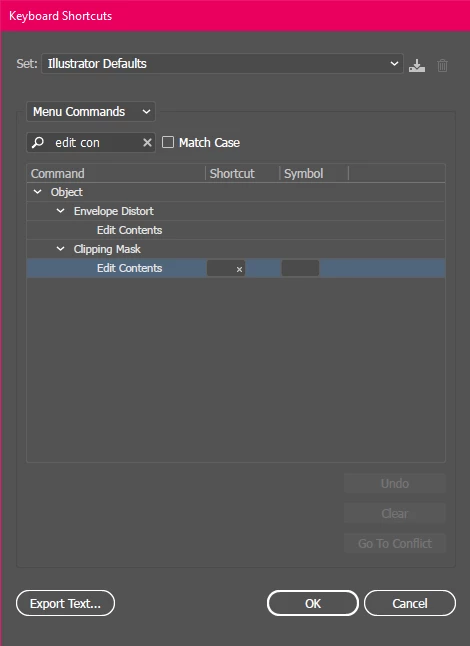
It doesn't have a default shortcut, but you can set one of your own. The menu command can be found under Object > Clipping Masks > Edit Contents:

2 replies

Doug A Roberts
Community Expert
Doug A RobertsCommunity ExpertCorrect answer
Community Expert
January 23, 2020

It doesn't have a default shortcut, but you can set one of your own. The menu command can be found under Object > Clipping Masks > Edit Contents:

Participant
January 24, 2020

thanks a lot  man. it's really helpful, hope you have a great day :)))))

Michael Bullo
Community Expert
Community Expert
January 23, 2020

Not sure if this helps or not but in case you didn't know…


If you are using the Selection Tool you can simply double click an object to get access to the objects within it.