Participant
October 22, 2019
Question

When file "kind" is Encapsulated PostScript, it will not open in Illustrator 2019 Mac

  • October 22, 2019
  • 4 replies
  • 758 views

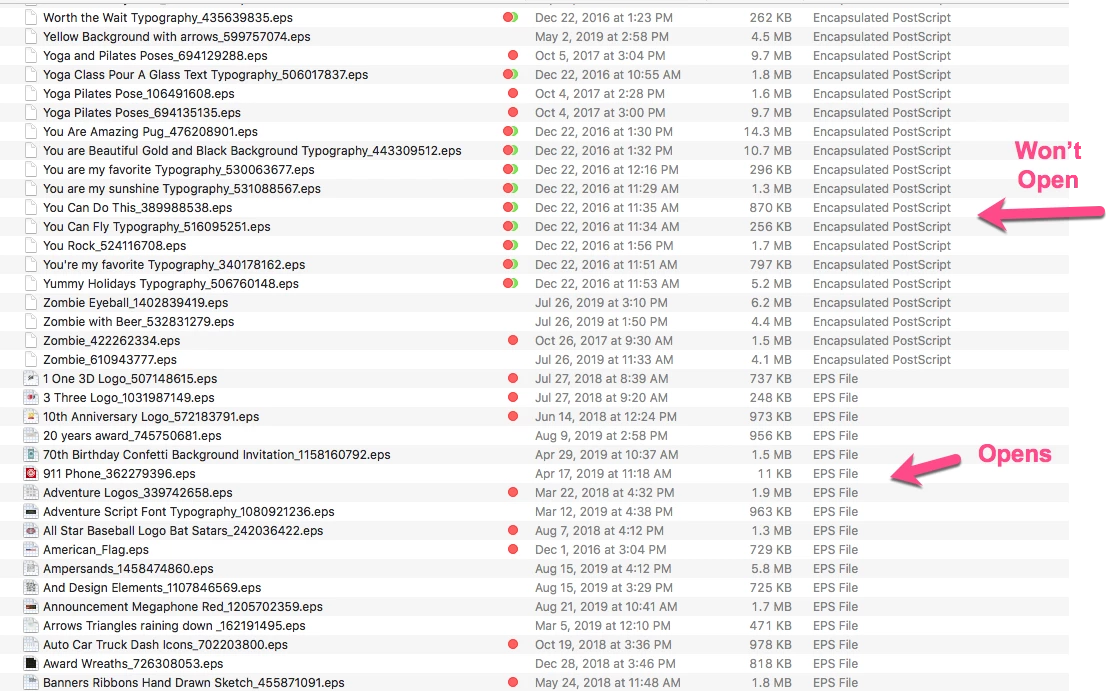
If I have a file that my Mac says it's "kind" is EPS, it will open just fine. If it's "kind" is Encapsulated PostScript, then it will not open at all. I have tried to select and EPS file and get info so that I can change what the file is opend with (Under Get Info, change Open With to open all docs like this in Illustrator), but it won't change the Encapsulated PostScript files. When I Get Info on the Encapsulated PostScript files, the "Open with" is grayed out and "terminal" is all that I can see.


I have searched high and low online and cannot find a solution.


Old files and new files are doing this. Many of these files are downloaded from Shutterstock. We still have our subscription.
 

    This topic has been closed for replies.

    4 replies

    jodip_neAuthor
    Participant
    October 30, 2019

    I updated my OS system and that fixed the problem.

    Mike_Gondek10189183
    Community Expert
    Community Expert
    October 23, 2019

    Try dragging a Encapsulated PostScript file onto your doc icon to force open in 

    • Illustrator
    • Acrobat, then fle >> export to >> eps and give a new file name
    jodip_neAuthor
    Participant
    October 23, 2019

    I've tried to do File, Open in Illustrator -- grayed out document name. If I do "see all files" and then it becomes not grayed out. Nothing. Drag it into the icon -- nothing. Drag it or open in Photoshop -- nothing. Drag it or open in Acrobat -- nothing. It's like it's an invisable file. I've tried to change the file extension to PDF and then back to EPS in the hopes it would recoginze it as an EPS file and not Encapsulated PostScript... nope. 🤷🏼‍♀️

    Monika Gause
    Community Expert
    Community Expert
    October 23, 2019

    If this is a Shutterstock file, then what do they say about it?

    EPS could have been generated by whatever application.

    Legend
    October 22, 2019

    You say it won't open, but you don't tell us what happens if you start Illustrator, then use Open. Double clicking is often limited or weird.

    jodip_neAuthor
    Participant
    October 23, 2019

    I've tried to do File, Open in Illustrator -- grayed out document name. If I do "see all files" and then it becomes not grayed out. Nothing. Drag it into the icon -- nothing. Drag it or open in Photoshop -- nothing. Drag it or open in Acrobat -- nothing. It's like it's an invisable  file.

    Monika Gause
    Community Expert
    Community Expert
    October 22, 2019

    This looks like an issue with your Mac OS. So you might want to try and get the solution from an Apple forum. There are countless issues with Apples database that handles this launching process, whichcover not only Illustrator, but a lot of other app s as well. On top of that, those Shutterstock  files might have been created by several different applications. EPS is built into any existing graphics application, that might have written anything into that file.

    Maybe also contact Shutterstock about it as they saved those files. Without actually seeing those files the issue will be close to impossible to solve. You could open them in TextEdit (set it to Text-only) and then in the code you might be able to see a pattern (creator application or version or whatever).