
Exit
  • Global community
    • Language:
      • Deutsch
      • English
      • Español
      • Français
      • Português
  • 日本語コミュニティ
  • 한국 커뮤니티
0

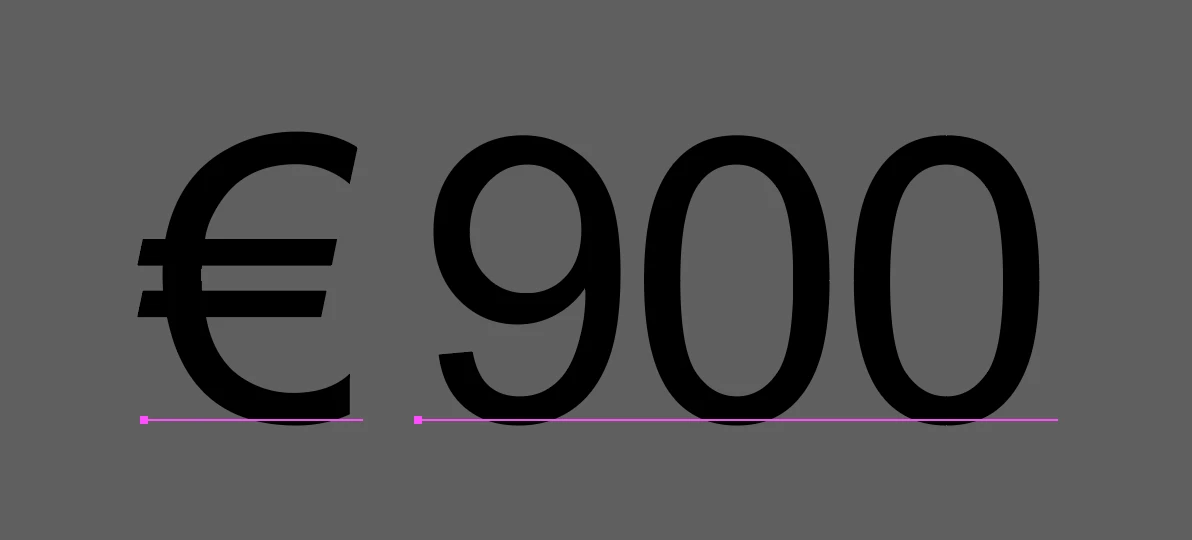
When importing charts from excel into illustrator, the euro or pound currency symbol is separate.

New Here ,
Mar 28, 2023 Mar 28, 2023

Wondering if anyone has ever encountered this or found a solution for it, when importing a chart element over from excel into illustrator with euro or pound symbols before figures, it breaks them out into two separate text elements. This is pretty annoying when you have to go back through and combine them into a single line of text again for each figure. Does anyone know of a possible solution to fixing this?
Screen Shot 2023-03-28 at 10.16.36 AM.png

TOPICS
Type
918
Translate
Report
Community guidelines
Be kind and respectful, give credit to the original source of content, and search for duplicates before posting. Learn more
community guidelines
Adobe
Mentor ,
Mar 28, 2023 Mar 28, 2023

>when importing a chart element over

How? Do you mean paste, or are you exporting to a particular format (what, pdf?) then importing?

If it's just " an element" of a page you need, you might want to export/save as (the page) to pdf, then open the pdf in Illy and copy the element from there and paste into you main doc...

Translate
Report
Community guidelines
Be kind and respectful, give credit to the original source of content, and search for duplicates before posting. Learn more
community guidelines
New Here ,
Mar 28, 2023 Mar 28, 2023

It's when you directly copy and paste the chart element into illustrator. When you do this usually every bit of text is it's own line, but for some reason when it has a euro or a pound symbol in front of it instead of a dollar sign, it treats it as two lines instead of one.

Translate
Report
Community guidelines
Be kind and respectful, give credit to the original source of content, and search for duplicates before posting. Learn more
community guidelines
Community Expert ,
Mar 28, 2023 Mar 28, 2023

This looks like what's typically happening when you open or import a PDF in Illustrator.

Translate
Report
Community guidelines
Be kind and respectful, give credit to the original source of content, and search for duplicates before posting. Learn more
community guidelines
New Here ,
Mar 28, 2023 Mar 28, 2023

It's a direct copy and paste of a chart element from excel, no pdfs involved.

Translate
Report
Community guidelines
Be kind and respectful, give credit to the original source of content, and search for duplicates before posting. Learn more
community guidelines
Community Expert ,
Mar 28, 2023 Mar 28, 2023

So. Since this works for two-fer, we might need to take into account that you have something installed that interferes with the clipboard.

Translate
Report
Community guidelines
Be kind and respectful, give credit to the original source of content, and search for duplicates before posting. Learn more
community guidelines
New Here ,
Mar 28, 2023 Mar 28, 2023
LATEST

If i had to guess it's an issue with how macs handle the glyph for euro with certain fonts. Nothing I try seems to work, but if I swap it to certain other fonts, the problem seems to go away after some roundabout steps. Pretty annoying to deal with when there are lots of data points!

Translate
Report
Community guidelines
Be kind and respectful, give credit to the original source of content, and search for duplicates before posting. Learn more
community guidelines
Participant ,
Mar 28, 2023 Mar 28, 2023

I use Windows 11 and Excel 365, and I'm not seeing this. Whether I assign the Euro mark as the 'currency' type or add the symbol manually into the cell, when I copy and paste the cell (and ungroup and Release Clipping Mask), it becomes a single line of text. 

Twofer_1-1680032077600.png


Translate
Report
Community guidelines
Be kind and respectful, give credit to the original source of content, and search for duplicates before posting. Learn more
community guidelines