Participant
August 14, 2022
Answered

Where are bold and italic?

  • August 14, 2022
  • 3 replies
  • 3362 views

hi, 

i am not finding the bold & italic font style in my illustrator 2021. how to find that?
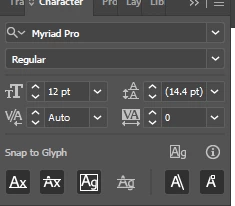

Correct answer Ton Frederiks

Other applications fake the bold and italic styles if they are missing.

You can do that in Illustrator as well by using the shear tool to fake italic and adding an additional stroke below the fill in the Appearance Panel, but don't let the font police catch you 🙂

3 replies

Kurt Gold
Community Expert
Community Expert
August 14, 2022

Ton,


Have you also found a way to make fake italic type for just some words inside a type object?


The Shear tool won't help in this case.


Ton Frederiks
Community Expert
Community Expert
August 14, 2022
Ton Frederiks
Community Expert
Ton FrederiksCommunity ExpertCorrect answer
Community Expert
August 14, 2022

Other applications fake the bold and italic styles if they are missing.

You can do that in Illustrator as well by using the shear tool to fake italic and adding an additional stroke below the fill in the Appearance Panel, but don't let the font police catch you 🙂

Ton Frederiks
Community Expert
Community Expert
August 14, 2022

Illustrator does not have a bold and italic style, only if the font has a bold and italic style and those are installed, you can select them.