
Known Participant
October 23, 2023
Answered

Where are my fonts?

  • October 23, 2023
  • 3 replies
  • 2167 views

I have just switched from Illustrator CS5.1 to Illustrator 2024. We have a couple of fonts that we have bought and use in the company I work for. Where can I find them in my new Illustrator version?

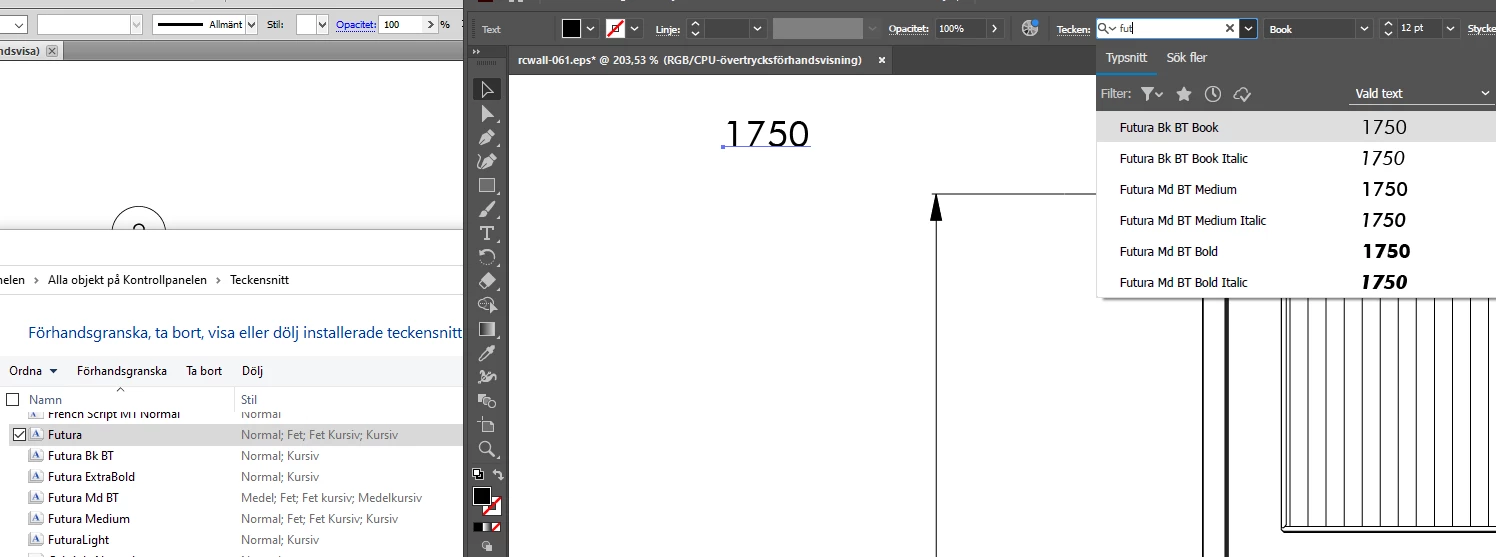
As you can see below, the font family Futura is installed on my computer, but when I search in Illustrator I only get Futura Bk and Futura Md. NOT the same font! Where are my fonts???


This topic has been closed for replies.
Correct answer Ton Frederiks

You can have multiple versions of Illustrator installed.

I Installed an older version of Illustrator: 2023 (27.0) and that still has support for Type 1 fonts.

In the Creative Cloud app select Apps > All Apps > Illustrator > click the 3 dots …  next to the Open button >  click Other Versions and select 27.0

If the OS does not support Type 1 fonts, you can put them in a folder named Fonts in the Illustrator application folder.

3 replies

Ton Frederiks
Community Expert
Ton FrederiksCommunity ExpertCorrect answer
Community Expert
October 23, 2023

You can have multiple versions of Illustrator installed.

I Installed an older version of Illustrator: 2023 (27.0) and that still has support for Type 1 fonts.

In the Creative Cloud app select Apps > All Apps > Illustrator > click the 3 dots …  next to the Open button >  click Other Versions and select 27.0

If the OS does not support Type 1 fonts, you can put them in a folder named Fonts in the Illustrator application folder.

Monika Gause
Community Expert
Community Expert
October 23, 2023

They look like PostScript Type 1 fonts. Those do no longer work in Adobe applications. You either need to use an older version (the lowest version that is still available in the Creative Cloud app might be able to still work with those fonts) or you get OpenType versions of the fonts.

Known Participant
October 23, 2023

Thank you. Googled "Futura light Open type" and came to an Adobe-page where I had to login, and then I could install Futura Light Pt. That seems to work. The funny thing is that the exact same text done in Futura Light and Futura Light Pt, are different sizes... When I printed them (24 pt size) it differed with 1 mm!  My old Futura Light was 1 mm higher than Futura Light Pt, but I guess I will have to learn what sizes to use 🙂

Monika Gause
Community Expert
Community Expert
October 23, 2023

Most likely you had Futura from a different font foundry. They can differ a lot and in a lot of ways.

Known Participant
October 23, 2023

And you think that this was a useful answer?

jane-e
Community Expert
Community Expert
October 23, 2023
quote

And you think that this was a useful answer?

By @Lena27020170w3wy


It was spam and has been removed.


Jane