
Participant
July 12, 2023
Answered

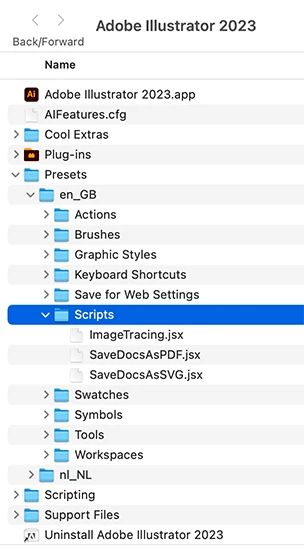
Where can I place script files so they show up automatically under "File --> Scripts" (on a Mac)?

  • July 12, 2023
  • 1 reply
  • 170 views

I'd like to have my scripts show up directly versus having to invoke "Other scripts' and then navigating to my scripts. I have placed my scripts in multiple places and restarted, but to no avail.
This topic has been closed for replies.
Correct answer Ton Frederiks

In the Application folder > Presets > your language folder > Scripts

1 reply

Ton Frederiks
Community Expert
Ton FrederiksCommunity ExpertCorrect answer
Community Expert
July 12, 2023

In the Application folder > Presets > your language folder > Scripts