Inspiring
June 22, 2023
Answered

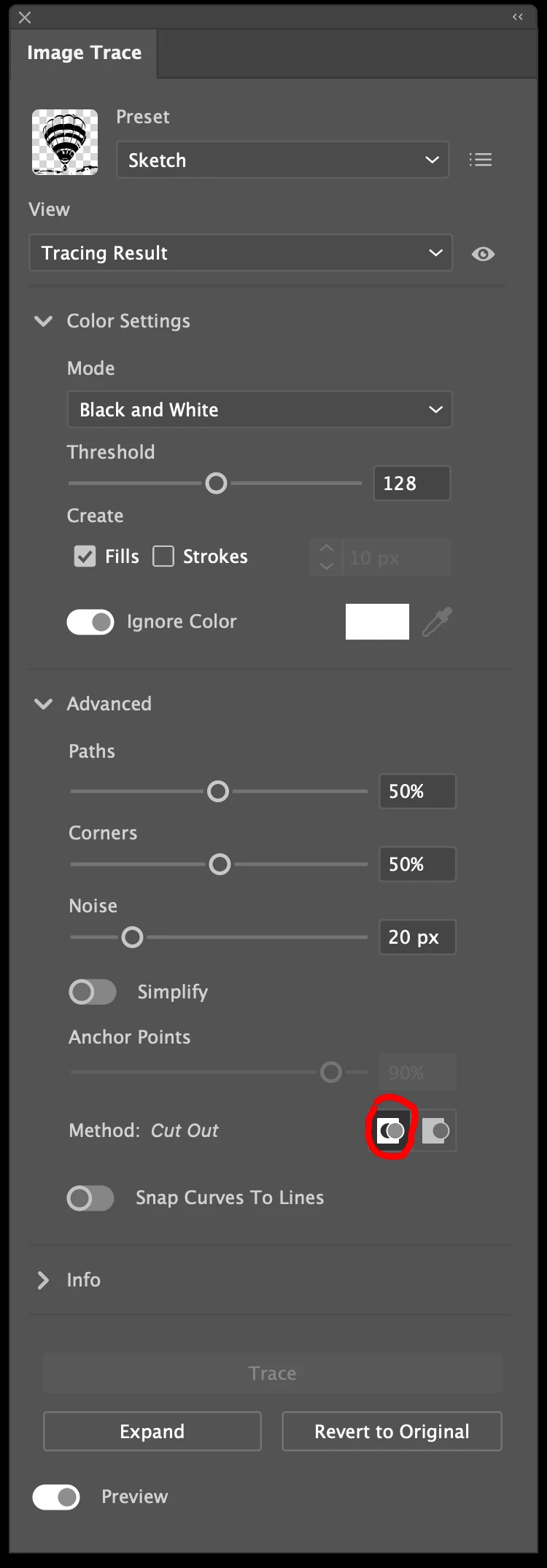
Where is the "ignore white" option on Image Trace?

  • June 22, 2023
  • 2 replies
  • 3571 views

Where is the "Ignore White" option on Image Trace?

 

This topic has been closed for replies.
Correct answer Mike_Gondek10189183

Also make sure you have cutout on


2 replies

Mike_Gondek10189183
Community Expert
Mike_Gondek10189183Community ExpertCorrect answer
Community Expert
June 23, 2023

Also make sure you have cutout on


Participating Frequently
July 21, 2023

Thanks Adobe, you have just made things harder than they were previously!

Monika Gause
Community Expert
Community Expert
June 22, 2023

You need to turn on the Ignore Color option and then select white


Ton Frederiks
Community Expert
Community Expert
June 22, 2023

But that does not work for grayscale images with black and white as colors.