Participant
January 29, 2022
Answered

White border around transparent PNG export

  • January 29, 2022
  • 3 replies
  • 9614 views

Everytime I'm exporting a drawing from Illustrator with a transparent background I get white border around the drawing. I think I tried every solution I found online, but it's not working. The artboard is 2048x2048 and I'm exporting at 72ppi with Supersampling selected. I also alligned the artwork to the pixel grid with total numbers only. I even tried exporting from Photoshop, but without loosing a lot of quality I can't get rid of the white borders. 


The following two images show the drawing in Illustrator and the image when imported onto another image. 



Anyone have some new suggestions on how to fix this?
Correct answer dayellowblossom

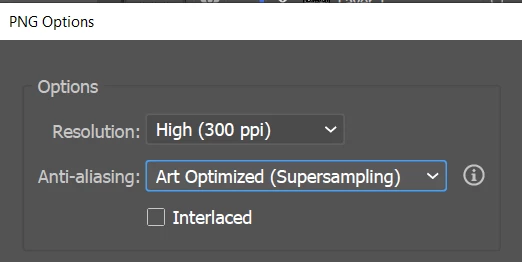
Hey, i just found out the problem, it might be because of the anit-aliasing options. I changed that to art optimized and the white edge was gone. Hope this help!


3 replies

Participant
July 6, 2023
Hye..i have same problem..do you find any solution?
dayellowblossomCorrect answer
Participant
March 28, 2025

Hey, i just found out the problem, it might be because of the anit-aliasing options. I changed that to art optimized and the white edge was gone. Hope this help!


Ton Frederiks
Community Expert
Community Expert
January 30, 2022

I cannot reproduce your result.

I autotraced your first image without white and exported at 1x and 2x. 

Of course 144 ppi shows less pixels, but I cannot reproduce the white edges.

Can you share that Illustrator file? (Dropbox, CC filesharing, Google, WeTransfer)

Ventral_Author
Participant
January 30, 2022

Okay that's interesting. Could it be that my laptop doesn't have enough processing power/GPU performance while exporting? 

Here is the .ai of the eyes: https://wetransfer.com/downloads/21e6953e37febf7b7509b4c46b726b3320220130073056/9b8de76ac71b7241e3aed7ad8d2f878220220130073116/39f9b9

Ventral_Author
Participant
January 31, 2022

Nothing wrong with your file, but if you used the file you send, it looks like you enlarged the result too much. How do you export? Export for screens? Don't use PNG8.


Tried almost everything, but usually just Export as and than with Supersampling selected. But also tried every other option.

Jacob Bugge
Community Expert
Community Expert
January 30, 2022

Ventral,


What happens if you abolish the supersampling/anti aliasing (to get the hard edges)?


It ought to work well without serious jaggedness at the size mentioned.

Ventral_Author
Participant
January 30, 2022

Same result unfortunately...


When I export as PNG-8 and not 24 I get rid of the white borders but the quality gets worse