
Participant
January 23, 2025
Answered

White box around png in Illustrator
  • January 23, 2025
  • 1 reply
  • 296 views

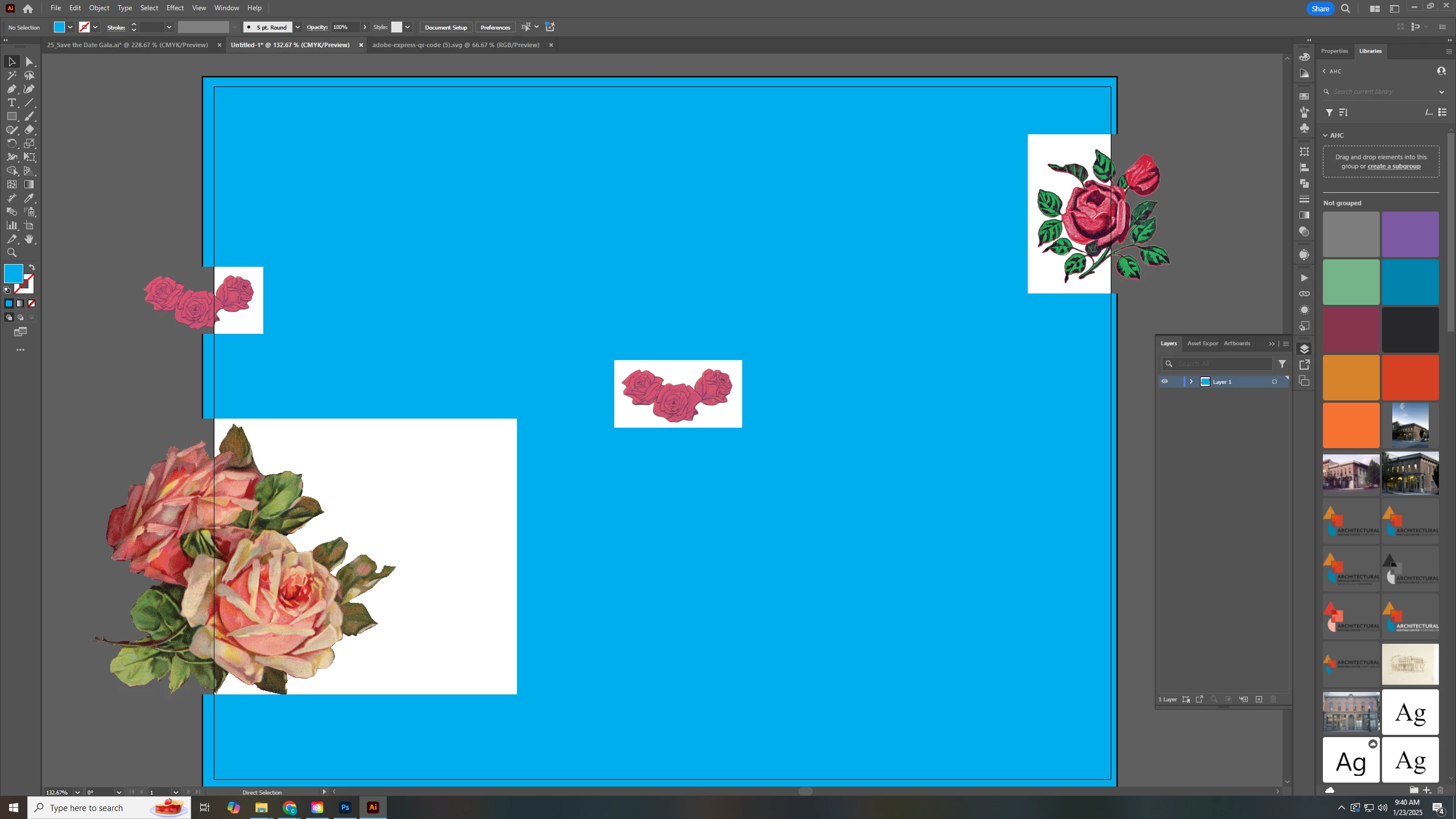
All of my imported and placed pngs have a white box that removes anything under it. You can see from my screenshot that once its off the artboard the white box goes away. This happened after Illustrator crashed.


I have updated and restarted my computer, but the issue still remains. I've never seen anything like this before. Please help!

Correct answer Ton Frederiks

Is it still the same when you use CPU Preview? Ctrl E to switch.

If it looks good in CPU Preview, try updating your graphics card.

1 reply

Ton Frederiks
Community Expert
Ton FrederiksCommunity ExpertCorrect answer
Community Expert
January 23, 2025

Is it still the same when you use CPU Preview? Ctrl E to switch.

If it looks good in CPU Preview, try updating your graphics card.

Participant
January 23, 2025

It looks good in CPU Preview. Thank you!

Ton Frederiks
Community Expert
Community Expert
January 23, 2025

I don't have a Windows system, but it may be worth checking if your graphics card has game optimized settings , then try to use some other setting for Illustrator.