

Why are my colors being inverted?
I'm using Illustrator Pro, CS6. Every once in a while, when I'm using the paintbrush tool, with a custom brush, the swatch color suddenly starts drawing in whatever the exact opposite color is, of hat I've picked. I keep trying to reopen illustrator or the project thinking there's a bug or something but nothing works. there must be some kind of weird setting that I'm tripping, that affects your swatches. A mask or something maybe?
A few things to note:
- This only happens when I'm using a custom brush head. I can literally draw with another brush and have it be one color, then change the brush and the color changes with it.
- This only happens every once in a while and on certain projects. It seems to come randomly. It also sticks around. If it happens in a project, that project is ruined forever, as far as this issue is concerned. It never goes away.
- This has been happening for years across multiple versions of illustrator, across multiple computers. It can't just be a
version bug or a problem with my computer. Has anyone else ever experienced this? I've seen nothing online about this
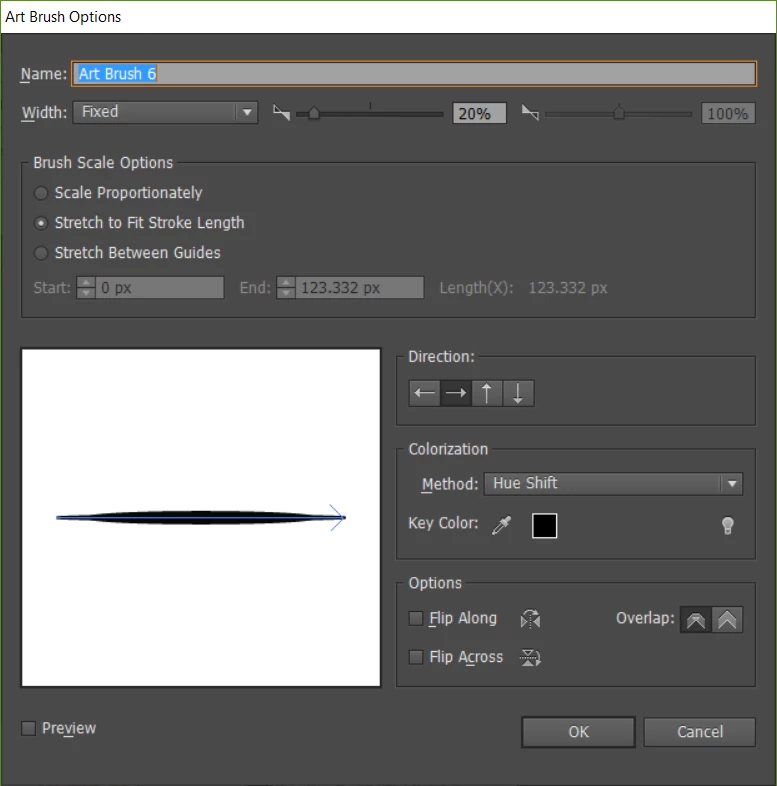
- I thought it might have something to do with my brush settings but I have no idea what I'm doing in there so here's a screenshot of my brush properties
Thanks
 AdChoices