
Participant
March 28, 2021
Answered

Why can't I find Pattern Preview?

  • March 28, 2021
  • 1 reply
  • 1179 views

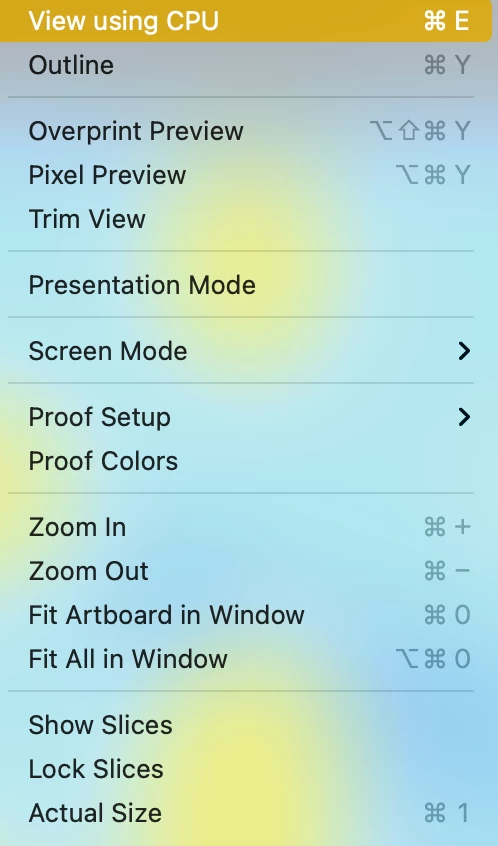
Help! I am trying to make a patter but can't find the Pattern Preview anywhere.... what am I doing wrong? I just created a new file 500px 500px and nothing... my View options also look different from the YouTube tutorials but I just bought AI so I guess it is updated
 

This topic has been closed for replies.
Correct answer jane-e

Hi @defaultmdn7ajsm2kqj 


You can double-click the Pattern in the Swatches panel or go to the Object menu and choose Pattern > Edit / Make. You are currently looking in the View menu.


I'll move this to the Illustrator forum.


~ Jane


1 reply

davescm
Community Expert
Community Expert
March 28, 2021

That menu is Illustrator not Photoshop, but you have posted in the Photoshop forum. Which application do you need help with?

Dave

Participant
March 28, 2021
Ohhh I didn't notice that. I need help with Illustrator
jane-e
Community Expert
jane-eCommunity ExpertCorrect answer
Community Expert
March 28, 2021

Hi @defaultmdn7ajsm2kqj 


You can double-click the Pattern in the Swatches panel or go to the Object menu and choose Pattern > Edit / Make. You are currently looking in the View menu.


I'll move this to the Illustrator forum.


~ Jane