


Inspiring
December 28, 2020
Answered

Why can't I get normal layers (instead of sublayers) in illustrator ?

  • December 28, 2020
  • 2 replies
  • 2406 views

Hello to you, and happy holidays 🙂 I created a vector illustration in a vector software other than Illustrator, that I exported in a PDF format.
My goal is to prepare this file in illustrator (rename some layers, rework them, ...), to then import it into After Effects, for a small animation of 10-15 seconds. But once I open the pdf in illustrator, all of my layers seem to be actually sublayers of a "layer 1" that I can't get rid of. We see on the image below that I have a selection of my sublayers: it is impossible for me to move it between layer 4 and layer 1.
I can move these layers to "layer 4" for instance, but then they remain sublayers.
In short, they remain sublayers of layer 1 (or 4) whatever I do.

And that's very boring because I need to have all my layers on the same level, to find them again in After Effect.

Could you help me to get these layers as "normal" layers, to allow me to open the complexe illustration in After Effects ?

Thank you !
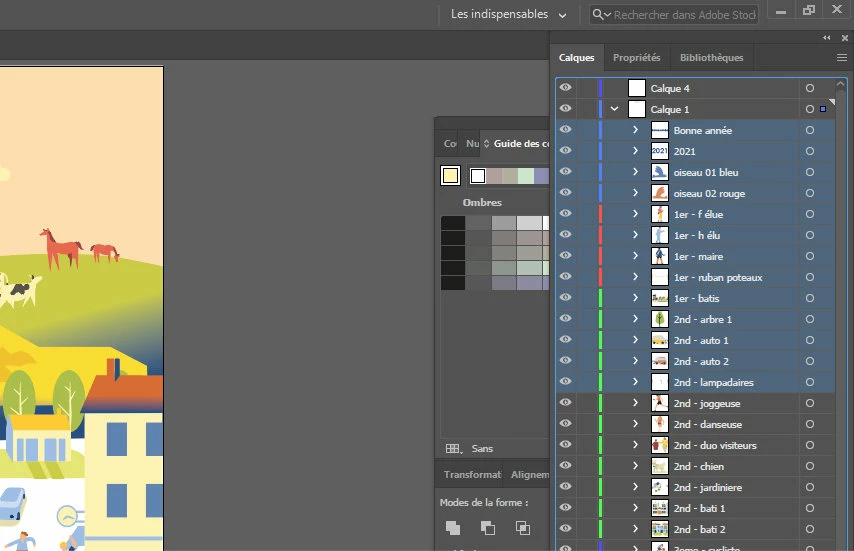


[ attachment inserted as inline image by moderator ]

This topic has been closed for replies.
Correct answer Sylvain Martin

Thank you Bobby.

Indeed the best solution is for me to export from Xara in .ai. I didn't have good results the last times, so I went directly by a "pdf way". But as I removed all bitmaps part of my xara drawing, now the .ai export is working very well. And I saved lot of time!

Thank you all

2 replies

Community Expert
December 29, 2020

Since the original artwork was designed in Xara it might be worth trying to export the artwork in a different format rather than PDF. Xara can export artwork in EPS or Illustrator format. If your artwork is already organized on layers within Xara then the layers may be maintained when exporting in EPS or AI.

Many graphics applications that can export PDF files often do so in ways that make the resulting PDF unfriendly to editing after the PDF file is created. Sometimes the artwork is a complete mess (especially when viewed in Outline/Wireframe view). Adobe Illustrator is the only application I know of that can save PDF files in a way that makes them behave just like normal Illustrator files.

Sylvain MartinAuthorCorrect answer
Inspiring
December 29, 2020

Thank you Bobby.

Indeed the best solution is for me to export from Xara in .ai. I didn't have good results the last times, so I went directly by a "pdf way". But as I removed all bitmaps part of my xara drawing, now the .ai export is working very well. And I saved lot of time!

Thank you all

Jacob Bugge
Community Expert
Community Expert
December 28, 2020

Stéphane,


What you see in Layer 1 is completely normal: they are your objects, which are all at the same level.


If you wish, you can collect them into Groups as desired in the following way for each desired Group:


1) Select each of the objects to include by ShiftClicking the circle to the right, undoubtedly you know them by their names, and my guess would be that they are already right under each other;

2) Press Ctrl/Cmd+G which will collect everything selected in 1) into a Group.


Everything is quite different from Photoshop; that also applies to the terms used.


Inspiring
December 29, 2020

Hello and thank you for your answer.

What I want is to get my sublayers at the same level than this "Layer 1". I don't want to have them as sublayers, but as layers.
I am not sure I understand what you suggests me (to do some groups ?). If I create a group with 3 or 4 of my sublayers, I can move this group, ok. But the sublayers remain sublayers of this group. So it is the same problem : sublayers don't become layers.


My problem is exactly the same than this person : https://community.adobe.com/t5/illustrator/how-to-convert-sublayers-to-layers-in-illustrator-and-keep-the-name/td-p/11360058?page=1


As Kurt Gold says at the end of this topic : Selected or highlighted main layers and sublayers are marked with a tiny triangle at the top-right corner of the layer entry. Groups and single objects don't have that label. You may check that


-> I don't get this tiny rectangle on my sublayers. So they aren't sublayers ? I can only remind that my first file was exported in PDF (not SVG). Is that cause the fact that the sublayers will never be considered as real sublayers in Illustrator ?


Inspiring
December 29, 2020

Here is a graphics of what was my process...