
New Participant
October 8, 2013
Question

Why can't I use Live Paint?

  • October 8, 2013
  • 3 replies
  • 35563 views

Hi,

I'm fairly new to Illustrator, but for a project I'm working on I've drawn a dragon using the pen tool. Now I want to use the live paint tool, however, after I select my dragon it won't let me "make" the live paint. I also can't expand, not sure if that's related.

I tested another simple drawing and was able to both expand and use live paint, so it must be something weird that I've done to my dragon.

I have a trial version of CS6.


Also attaching a screen cap.
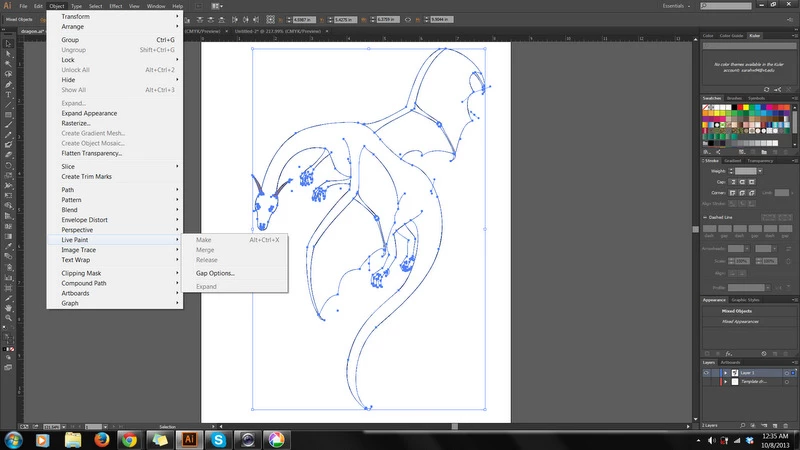

Thanks for any help/advice!!!

This topic has been closed for replies.

3 replies

Steve Fairbairn
Inspiring
October 9, 2013

I think you would really do better to start again.

Think of your drawing as a stack of closed paths (which, with Pathfinder, you can build up by uniting smaller units if it suits you better).

Sure, you CAN use Live Paint but you would do better to learn to do the job properly from the start (like Live Paint after expanding).

Not that Live Paint is exactly cheating but you will learn more by doing things the other, older, way.

New Participant
October 9, 2013

Yep, that's what I did.
I'm learning on my own so I've been watching lots of tutorials, but sometimes it's hard to find the good info.
Going better now though.

Inspiring
October 9, 2013

Tutorials are good for beginners, but playing around on your own is also good and may help you advance faster. This will make you encounter more problems like the one you had and looking for the reasons and finding them will teach you to solve problems. Advanced users are working by solving problems all the time - they are not following tutorials. You will not find tutorials for everything you may need to create.

Monika Gause
Adobe Expert
October 8, 2013

While all this stuff

Stray points/ segments, self intersecting paths and all the ingredients that make for a "bad" vector artwork

certainly should be corrected, it shouldn't keep you from making a live paint object. So there must be something else in this drawing. Please show the complete layer panel (expand the layer so it's visible. And please don't scale down your screenshots.

New Participant
October 8, 2013

Oh sorry. I did that because it didn't fit.

But maybe I should just start over...

Inspiring
October 8, 2013

I'm not sure if this is the problem but try this: select all and from the flyout menu of the Appearance panel, choose Reduce to Basic Appearance. In my verion CS5 Illustrator does this automatically after showing a warning message for appearances like variable width strokes that your drawing has and are incompatible with Live Paint .

To keep the outlines with variable width strokes you can duplicate the layer on top, lock it, remove the stroke from all on the layer below and apply the Live Paint to it.

Mylenium
Brainiac
October 8, 2013

Your drawing is a blody mess. Stray points/ segments, self intersecting paths and all the ingredients that make for a "bad" vector artwork. You need to spend time cleaning it up.

Mylenium

New Participant
October 8, 2013

Oh okay, thanks! As I said fairly new to illustrator.
I see the stray points...Do you mind pointing out one of the problem areas? What is a self intersecting path...?

Jacob Bugge
Adobe Expert
October 8, 2013

Luci,

What is a self intersecting path...?

8 is 1 (one).