Participant
June 27, 2024
Question

Why does the UX of adobe products suck so hard?!

  • June 27, 2024
  • 5 replies
  • 4358 views

Just take a look at the following screenshot of the Illustrator UI, and PLEASE do your job or quit!
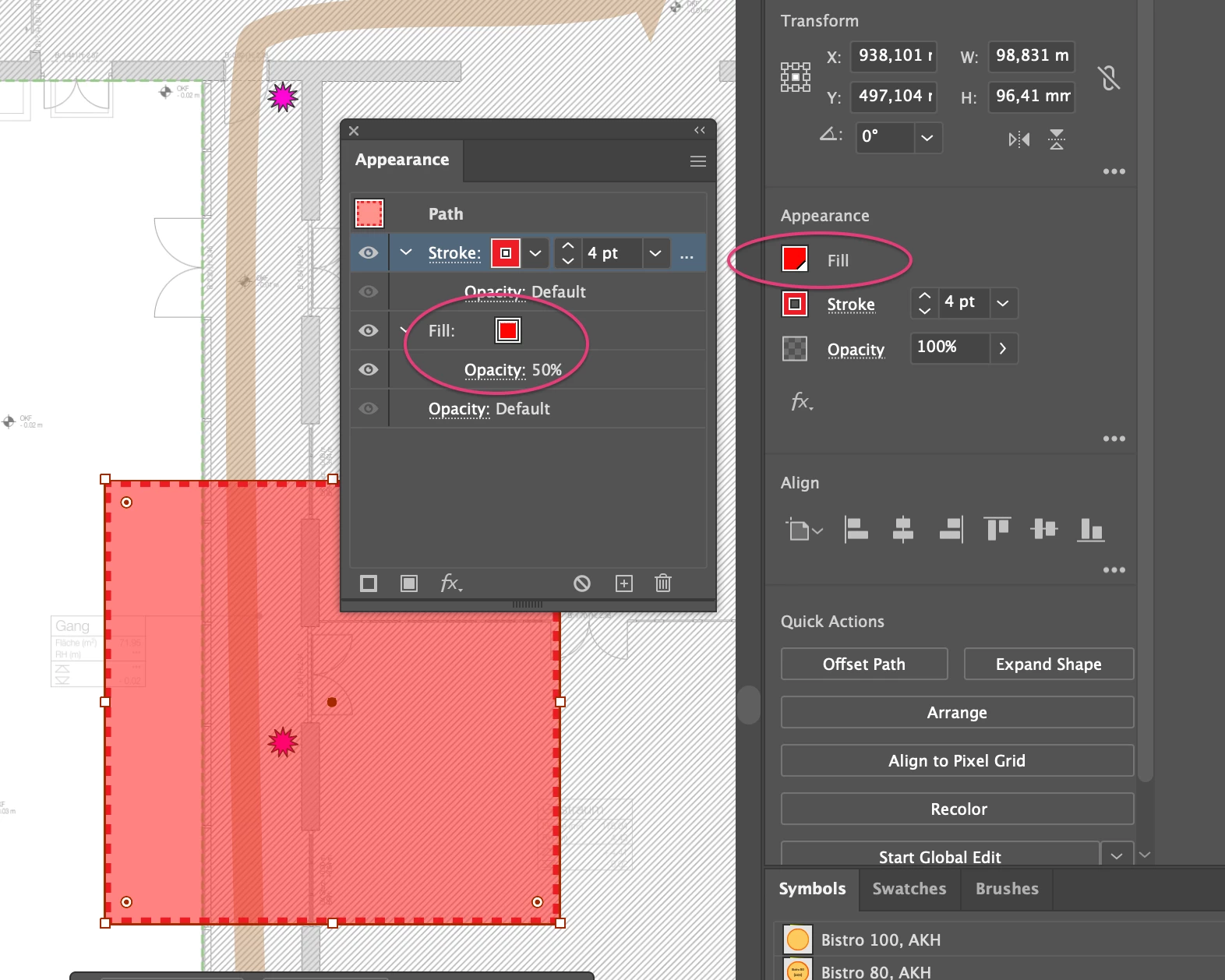


Why is this both called "appearance" but why I only have access to advanced options of strokes, and why do you throw your properties and options all over the place and not f*kn consolidate them so that I can find the bl**dy function that I am looking for all in the same place!?
I had to search on the open sea of the internet - the help community search is just weak - for 15 minutes to learn how to change the fill opacity of a simple rectangle! WHY!?! it is the most simple object around! Why do I need to look up such simple manipulations somewhere in some random dude's illustrator guides?!

I moved away from Illustrators several years now - I was very proficient user and I was always hoping it would at some point be fixed.

But no! It keeps getting worse and worse and worse. Adobe products are the anti-thesis to a good UX and, unfortunately, that a company will not survive on bad UX. But adobe proves us wrong time after time after time.

Please fix your UX! It stinks! And you know it.

5 replies

Inspiring
April 10, 2025

From the picture, I'm curious why both panels show the fill and stroke weight, but one shows the opacity at 100% and the other shows opacity at 50%.

Monika Gause
Community Expert
Community Expert
April 10, 2025

One is the opacity of the fill, the other is the opacity of the object.

Inspiring
April 10, 2025

Thank you for the clarification.

Inspiring
December 11, 2024

They have to much money to care about user experience. They do care about share holder value

Community Expert
June 27, 2024

For starters, user interface design is a very subjective thing. One person's idea of a good user interface might be pure garbage in the eyes of someone else. Not everyone thinks the same way or is going to go looking in the same places within an interface to find a function. Illustrator does have several stock workspaces and those workspaces can be customized a great deal.


The first version of Adobe Illustrator was released 37 years ago. Its user interface has slowly evolved through all of those years. There are many long-time users of Illustrator, people who have been using the application for 20 years or more. For better or worse many of us are used to how the application's UX is arranged. Any sudden, big changes (or "improvements") may throw off the work-flow for a lot of people and get them pretty angry. If the developers of Illustrator want to make any big changes to the user interface they have to walk a tightrope when doing so. For example, look at all the user fury that occurred when Apple released Final Cut X.


The situation is compounded by Adobe's many applications sharing a similar user interface theme. Are there things that can be improved in Illustrator's UX? Sure. But it's easier said than done.


None of Illustrator's rivals (such as CorelDRAW, Affinity Designer, Inkscape, etc) are perfect. They have their own strengths and weaknesses. I wish I could replicate the very fast/easy CorelDRAW keyboard shortcuts for object alignment/distribution within Illustrator. So far I haven't been able to do so because every "recipe" I've tried creates conflicts with a bunch of other existing keyboard shortcuts. Likewise, I wish the Bezier tool in CorelDRAW didn't suck so bad compared to Illustrator's Pen tool. Again, it's a matter of keyboard shortcuts plus a much smoother artwork preview in Illustrator.

Known Participant
April 10, 2025

The problem is that Adobe have been there since the start and have clung to old design practices that other newer platforms never adopted. Sometimes, it's good to start from scratch. I've been using PS since the late 90's (Photoshop 5) and in essence very little has changed in their UXUI. 

Different with Lightroom. Lightroom CC was a clear departure from old design practices, just badly executed. Instead of finishing the job, they just created two separate versions of Lightroom. With different feature sets. Horrible. 

Change is always hard, but having to guide new people through a 25+ yo design methodology is painful. 

Monika Gause
Community Expert
Community Expert
April 14, 2025

I don't use Illustrator. Could never get over the steep learning curve, didn't see the point. My needs didn't justify it.  

My feedback is generic Adobe, as all of its software are the same design methodology, doesn't matter what application you use. Illustrator is particularly frustrating for simple tasks so I abandoned it in favour of simpler vector tools like Flash at the time. Don't come at me with "you can't compare them". Yes you can. 

I've used Photoshop since 1998. The problem here is perfectly captured in your rant. You're used to your software and you don't want things to change. And here's why - because people needed to shell out THOUSANDS of dollars for software for the privilege of owning it. Your ego is attached to it.

Software doesn't work like that anymore and no, people don't want to invest hundreds of hours into something that other software can do much faster. Adobe is no longer exclusive and a badge of honour. Today, anyone can afford to use Illustrator. And that invites feedback from people who're not going to waste their time if it takes a college degree (literally) to use it. I'd love to use Illustrator but I just hate it's complexity so much that I avoid it.


@EmeraldSkies  schrieb:

people who're not going to waste their time if it takes a college degree (literally) to use it. I'd love to use Illustrator but I just hate it's complexity so much that I avoid it.


It's a professional app used by people for their professional needs and by anyone else who needs that complexity at their hands without having to dive through a dozen menus in order to reach a button that a casual user doesn't want to see. It's not about an ego, it's about mastering a tool, because tht tool is the most efficient for the job (even if you cannot imagine that this is possible).

Srishti Bali
Community Manager
Community Manager
June 27, 2024

Hi @HänkSchuh


We hear you and understand your frustration. We'll certainly pass your concerns on to the relevant team. In addition, I kindly request that you share this suggestion on our UserVoice page. This will allow other users to upvote your feedback, and the more votes it receives, the higher the priority it will get for future updates.


Thank you for your patience and understanding.


Regards,

Srishti

Participant
September 7, 2024

InDesign is a POS. After 25 years it still crashes constantly, the UI breaks, it corrupts files. It's an amateur joke. I wish I never had to use the trash Imdesign ever again. 

Doug A Roberts
Community Expert
Community Expert
June 27, 2024

Just use the Appearance panel. Ignore the Properties panel.

Participant
June 27, 2024

Thanks, Doug... that's exactly the point I was trying to make.

I'm not going to continue being sarcastic below.


Tell me, how often do you feel frustrated about the UI of Illustrator? How much time does it cost you to dig into a new feature or an old one you haven't been using in several years? How much effort should it be to understand basic manipulations of shapes and colors? Do you want your tool to be an impediment to your work or to you want it to support your workflow? Do you want your tool to get your job done or do you want to do a research on how to use the tool before you get your job done?
We pay a good yearly fee to a company that does not work on improving things for you. They bloat the software with new half cooked features, even paste a toolbar right in front of your workspace for an AI-Gen for shapes and some other non-contextual tools to the effect that this leaves the impression of an old school banner obscuring the view on my work - and they do not cater to their users' needs with that money. They invest into the Adobe Marketing Cloud, probably syphoning data for their own uses,  I am assuming ignoring privacy issues on the go and presenting us with tools that just suck when you need to use them a few times a year. Google did a better job on that - and their tools are mostly for free. Not to mention figma.

The outcries that went through the figma community when they announced the deal with Adobe do have their reasons.

The UX is pure frustration - and I do not see the investment that was done during the years of transition from local software to creative cloud. Those were the times when I had hope. But what I see now feels like a scam.

Monika Gause
Community Expert
Community Expert
June 28, 2024

You are probably using Figma day in day out and you are using all the features every time. So how hard will it be to un-learn something?

As for Illustrator: it's a professional tool. If you put in the effort to really learn how it works (and not just watch a 2:30 tutorial about the steps leading to an effect you want to get), then you'll be able to do it again and again. It's like learning to ride a bicycle.