
Answered
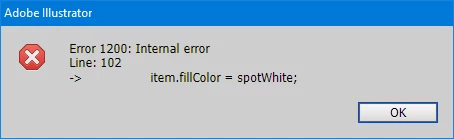
Why does this error occur? - Creating a custom spot color when it is already present in the document
Is it possible to find a problem here? First, a spot color is created and assigned to the global variable spotWhite, which is used further in the wrapper script. But the problem is that if this color is not in the ai file, then everything is ok, but if such a spot is already in the file, then I get an error.
// CustomSpot.jsx
var spotColor;
var spotWhite;

if (app.documents.length > 0) {
    var doc = app.activeDocument;

    for (var i = 0; i < doc.spots.length; i++) {
        if (doc.spots[i].name === "W") {
            spotColor = doc.spots[i];
            break;
        }
    }

    if (!spotColor) {
        ...
        // creating new spot
    } else {
        alert('the color is present');
        spotWhite = spotColor;
    }
}


// wrapper file
#target Illustrator

#include "CustomSpot.jsx"

main();

function main() {
    ...
    /*
    in case there was no color W, everything works as expected
    but when there is color W in the swatches it doesn't work
    */
    item.fillColor = spotWhite; // error
    ...
}
Got around this error by first deleting an existing spot with that name, but that doesn't explain the error shown, which looks like a bug.
 AdChoices