
Known Participant
April 21, 2017
Answered

Why does zoom feature change in outline mode?

  • April 21, 2017
  • 3 replies
  • 2619 views

When I am not in outline mode and I hold control + shift I can zoom in and out by dragging the mouse.  However, when I switch to outline mode (control + y), the zoom changes to the old version where a bounding box is created when I drag the mouse and upon releasing the mouse button, it zooms to the bounding box borders.  Is there anything I can do in settings to retain the drag/zoom feature from preview mode inside the outline mode?

Thanks,

Paul
This topic has been closed for replies.
Correct answer Mike_Gondek10189183

Hi Paul,

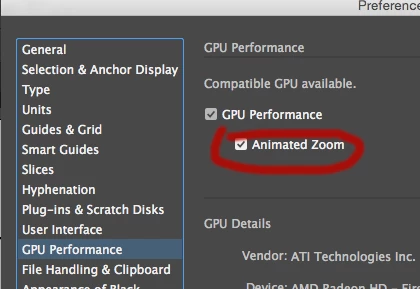
That is because outline view does not use the GPU..

Unfortunately you can only do the opposite and turn off animated zoom, so both view work the same.

3 replies

THreeSH98
Known Participant
September 19, 2022
Known Participant
June 27, 2021

4 years and no solution.

----------------First Photoshop 2.5 (1994)
July 27, 2021

That's Adobe in a nutshell. Same with InDesign and After Effects bugs. They just pretend these bugs dont't exist because they got enough people paying for the cloud. One of their telephone support "techs" once told me in all honesty "There are no bugs in Photoshop.". 
I'm really fed up with Adobe, Hopefully there will be some kind of competition they cannot just buy because this just cannot go on.

Mike_Gondek10189183
Community Expert
Mike_Gondek10189183Community ExpertCorrect answer
Community Expert
April 21, 2017

Hi Paul,

That is because outline view does not use the GPU..

Unfortunately you can only do the opposite and turn off animated zoom, so both view work the same.