sugarcoated293
Known Participant
February 7, 2018
Answered

Why doesn't illustrator reflect properly?

  • February 7, 2018
  • 5 replies
  • 9178 views

Hi,

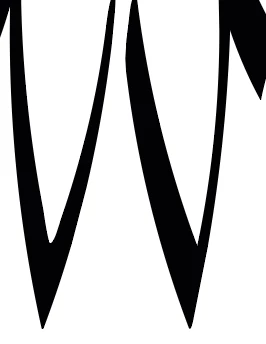
I am having trouble reflecting the first V (vertically). As you can see when they are side by side, it is not a true reflection. Does anyone have a good solution? Thanks!

This topic has been closed for replies.
Correct answer Monika Gause

Instead of expanding try and make a symbol, then reflect the symbol instance

5 replies

sugarcoated293
Known Participant
February 17, 2018

Thank you all!

It helped to make it a symbol!

Ares Hovhannesyan
Community Expert
Community Expert
February 10, 2018

Did you use Reflection Tool Panel? Also you can reflect with ALT+Transform(+SHIFT).

Doug A Roberts
Community Expert
Community Expert
February 10, 2018

ares: you'd get the same thing with both those methods.

making a symbol is probably more practical than expanding.

sugarcoated293
Known Participant
February 10, 2018

HI Doug,

I reflected it using the reflect tool (vertical reflection then made a copy).

They were constructed via Illustrator using my Wacom tablet to draw them and selecting a calligraphic brush from the brush tool in Illustrator.

Doug A Roberts
Community Expert
Community Expert
February 10, 2018

the path gets reflected, but the brush applied to it stays the same. you'll see similar things with other transformations, like rotate. i think you'd need to expand the appearance to reflect it properly. i can't think of another way off the top of my head anyway.

Monika Gause
Community Expert
Monika GauseCommunity ExpertCorrect answer
Community Expert
February 10, 2018

Instead of expanding try and make a symbol, then reflect the symbol instance

Doug A Roberts
Community Expert
Community Expert
February 7, 2018

how are you reflecting them and how are they constructed?

Legend
February 7, 2018

Distortions like this are often caused by Align to Pixel Grid being selected in the Transform pallet.