
Participant
March 15, 2023
Answered

Why is Illustrator loading plugins from a non-standard location?

  • March 15, 2023
  • 5 replies
  • 2900 views

Illustrator 27.3.1 (Windows)

A plugin error comes up when Illustrator is launched.
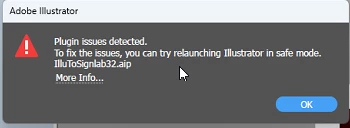
 

It turns out this plugin resides in C:\Vision Pro 9 which is the installation folder for a different software package that runs a CNC machine.


First of all, why is Illustrator even attempting to load plugins from this folder in the first place?


If I rename IlluToSignlab32.aip to IlluToSignlab32.aip.DISABLE, effectively hiding it, Illustrator won't even launch.
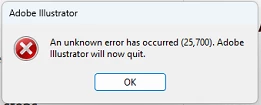
Clicking Ok and relaunching gives the option to Run Diagnostics (i.e. Safe Mode). While launching in Safe Mode the same unknown error dialog box comes up and Illustrator still won't launch. Any subsequent launches just bring up the same unknown error dialog box. So Safe Mode is basically useless in this case.


On further testing if I don't rename the plugin but instead move it to the desktop, Illustrator still tries to load it from the desktop. It seems as if Illustrator is loading .aip files from anywhere and everywhere. It was my understanding that plugin needed to be in C:\Program Files\Adobe\Adobe Illustrator 2023\Plug-ins in order to be seen. Has this behavior changed? Is there any documentation on it? I can't find any.


In any event it's bizzare and frustrating that some 3rd party plugin that shouldn't even be recognized is causing so many problems with Illustrator.

Correct answer jay_woo

Hello there. I just wanted to add that this works perfectly; adding keywords for other people searching for this answer. It applies to EngraveLab (from CADLink) as it's using the same AIP  plugin.

5 replies

DanW R2R
Participating Frequently
July 26, 2023

I had the same issue. Have a look in the Plugins folder for a short cut named PublishTo.aip. Move that to the desktop and Illustrator should open normally. 

Participant
August 3, 2023

Thanks, Dan this worked.

Legend
March 22, 2023

Hmm, could you search the registry for both the plugin name and its path? Unlikely though, after your desktop experiment.

Met1
Legend
March 15, 2023

I'm guessing you don't know what the "Plugin issues detected" are?

Could it be that it isn't in the plugins folder? Have you tried putting it there? I know you don't need this plugin, but if this solves the issues...

Community Expert
March 15, 2023

I think there is an option within preferences to set the path to a folder from which one can load their plugins. I can't verify this as I don't have Illustrator installed, but searching about it tells me that the option is at the following path

Preferences>Plug-ins & Scratch Disks>Additional Plug-ins Folder

Hope this helps

-Manan

-Manan
Participant
March 15, 2023

Yep, an additional plugin folder can be specified in preferernces. In this case it is not though.

Community Expert
March 24, 2023

In InDesign we have a feature where we can provide the alternate plugin load locations. This is done by making entry for these folders in a text file. I am not sure if Illustrator has something on the same lines. Some Illustrator veterans could confirm, I am not able to find something like this so far.

-Manan

-Manan
Participant
March 15, 2023

Adding to my original post... this was a brand new installation of Illustrator. I have since tried to

- Reset preferences (Shift+Ctrl+Alt while launching)

- Uninstall/reinstall Illustrator


Neither have made a difference