Participating Frequently
March 9, 2023
Question

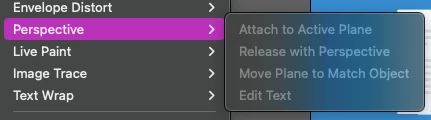
Why is Object > Perspective not available

  • March 9, 2023
  • 1 reply
  • 3098 views

It doesn't matter if its a simple rectangle. The option is always grayed out. Yet another very frustrating UX issue. 
 

This topic has been closed for replies.

1 reply

Doug A Roberts
Community Expert
Community Expert
March 9, 2023

Is the perspective grid visible? If not, go to View > Perspective Grid > Show Grid (or click on the grid tool).

Saro GFXAuthor
Participating Frequently
March 9, 2023

I guess what I was looking for is the 'Perspective Transform / Distord'. So this menu was a wrong assumption of me. It is where it is in Photoshop, but I guess we can't expect any kind of consistency anymore at Adobe. 


I also tried the perspective tool, but the scaling doesnt make much sense to me. Why is the bottom right of this object not  exactly aligned with the perspective lines? 


Also when I drag the group with the perspective selection, it starts losing random objects inside the group. I sometimes really wonder how anyone can get any work done with AI. 


Doug A Roberts
Community Expert
Community Expert
March 9, 2023

I don't know what steps you've taken exactly so it's hard to advise where you've gone wrong. I have no trouble moving a similar group onto the grid:

In your second image it looks like the corner flap isn't part of a group and isn't selected.
