


Copy link to clipboard
Copied
In illustrator I have the following:
A three text frames with the following names:
Custom1, Custom2, Custom1Only
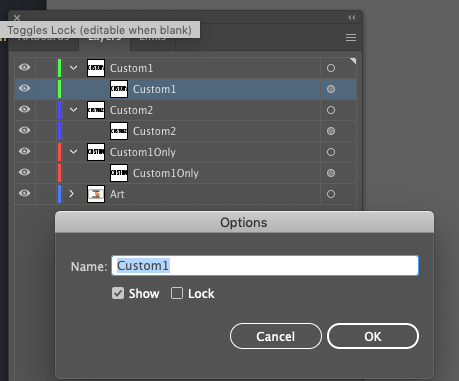
Custom1 is visually there in the options box when I double click the textframe.
However in scripting when I try to loop over them and get the name like so:
var iDoc = app.activeDocument;
var frames = iDoc.textFrames;

for (var i = 0; i < frames.length; i++) {
  alert(frames[i].name)
}
The name appears empty. This is makes it so I can't select it. Any idea why this is happening?


 1 Correct answer


is the text on the artboard "Custom1"? then the frame is probably not named, most likely it's a "preview" of the contents
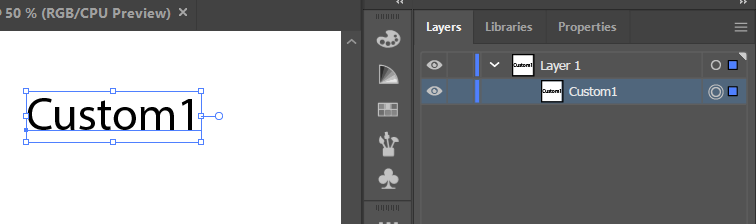
if you update the text on the Artboard to "Custom 2", does the text in the layers panel change automatically to Custom 2? then the frame it's definitely not named.


Explore related tutorials & articles
 7
Replies
7
7
Replies
7


Copy link to clipboard
Copied
Yes it is confusing. Think of it this way:
1. If the textFrame has a name, the Layer Palette shows that name.
2. If the textFrame doesn't have a name (the default), the Layer Palette shows the textFrame's contents.
So even though the Layer Palette shows a name, it might have no name. You must give it a name deliberately, even if the name is just its own contents.
Copy link to clipboard
Copied
How do I "give it a name"? In the example above I double clicked it and manually typed in that name. It still shows empty in code.
Copy link to clipboard
Copied
Here's the simplest example:
var _textFrame = app.activeDocument.textFrames[0];

if (_textFrame.name == '') {
    _textFrame.name = _textFrame.contents;
}
Also have a read about the TextFrameItem object. Another good thing to do is search for illustrator scripts and look through them and see how they work. Then look up the various objects in the docs.
Copy link to clipboard
Copied
By the way, when I double-click in the Layer Palette and edit the name, then the new name I gave it *does* show up when I ask for _textFrame.name. I don't know why that isn't working for you. Strange.
Copy link to clipboard
Copied
Here's another thread that covers this issue.
Copy link to clipboard
Copied
is the text on the artboard "Custom1"? then the frame is probably not named, most likely it's a "preview" of the contents
if you update the text on the Artboard to "Custom 2", does the text in the layers panel change automatically to Custom 2? then the frame it's definitely not named.

Copy link to clipboard
Copied
It's the same with most items (a notable exception being layers, which are named automatically). For example, if you add a pathItem, it will be unnamed and show up as <path> in the layers panel.
var path1 = app.activeDocument.pathItems.rectangle(0, 0, 25, 25);
alert( path1.name );  // empty string
path1.name = "path1";
alert( path1.name );  // path1

Get ready! An upgraded Adobe Community experience is coming in January.
Learn more
 AdChoices