
Chris  P.  Bacon
Inspiring
November 19, 2022
Answered

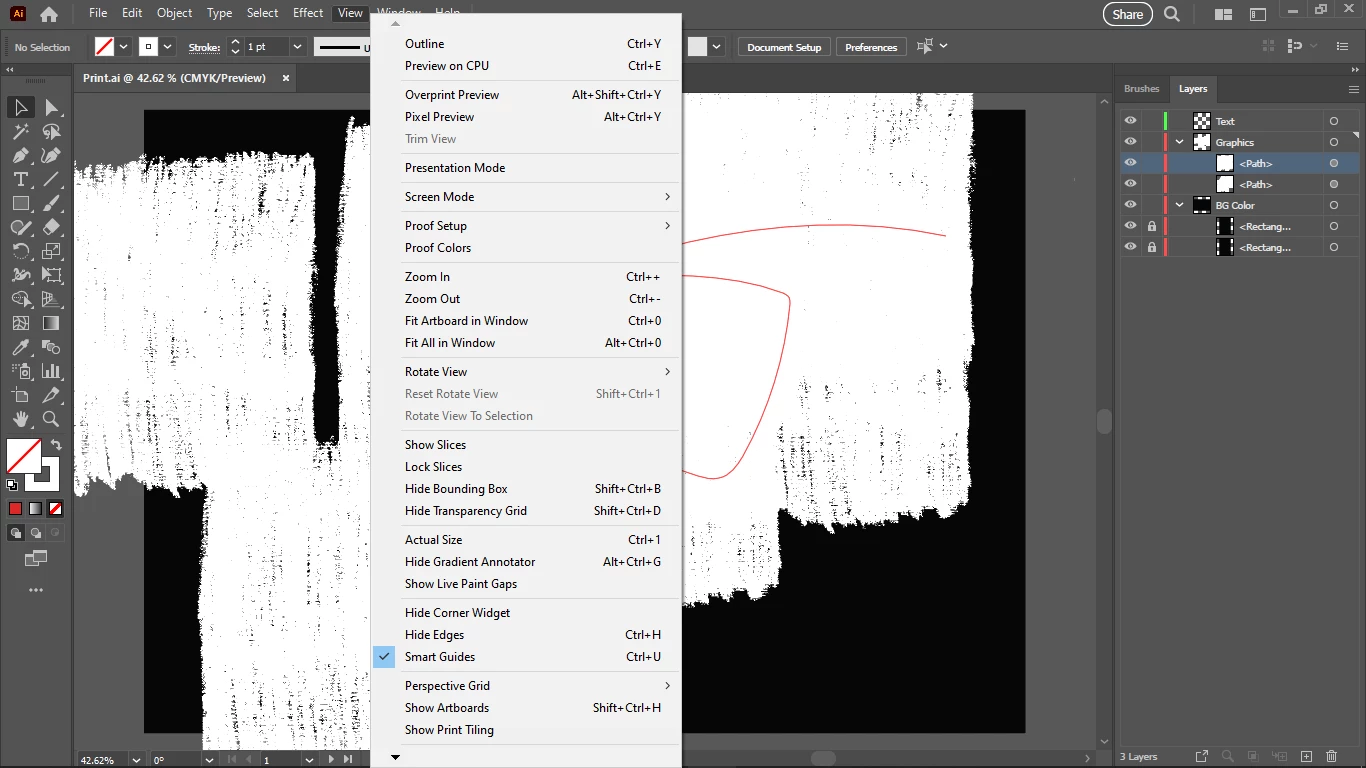
Why is trim view greyed out?
  • November 19, 2022
  • 4 replies
  • 2996 views

This topic has been closed for replies.
Correct answer Chris P. Bacon

It was caused by too many brushes saved into my Print.ai, probably memory issue, despite that I have 32 GB of RAM.

My Print.ai was 300 MB.

Trim View still worked in a new doc based on my Print.ai, until I opened my brushes tab, then it got disabled.

4 replies

Chris  P.  Bacon
Inspiring
November 20, 2022

How should I store my brushes so that it will not freeze my system?

I have 32 GB of RAM.

Now I loaded my 233 MB brushes from a separate ai file into my Print.ai but I cannot scroll well because it's freezing the system.

If I keep all my brushes in a separate AI file, how can I see all of them at once?

But that doesn't seem like a good idea.


Chris  P.  Bacon
Inspiring
November 20, 2022

I posted the link to the file, reported the Print.ai document profile that disables Trim View, even before the Brushes tab is opened. 

Chris  P.  Bacon
Inspiring
November 20, 2022

If I save my 300 MB brushes in a separate .ai file, and load them into my brushes panel into my new reset clean Print.ai, I can have all the brushes and it does not disable Trim View. It only disables it if they are saved inside the document profile. It seems it's better to load the brushes into the document profile from a separate .ai file.

Ton Frederiks
Community Expert
Community Expert
November 20, 2022

That is how libraries work. You load the library, use the brush you want and only save that brush with the file instead of all the brushes from the startup document that you did not even use.

Chris  P.  Bacon
Inspiring
November 20, 2022

I see.

So Libraries don't necessarily require Adobe Cloud?

Because I want to keep my assets on the cloud service of my choice.

Chris  P.  Bacon
Chris P. BaconAuthorCorrect answer
Inspiring
November 20, 2022

It was caused by too many brushes saved into my Print.ai, probably memory issue, despite that I have 32 GB of RAM.

My Print.ai was 300 MB.

Trim View still worked in a new doc based on my Print.ai, until I opened my brushes tab, then it got disabled.

Monika Gause
Community Expert
Community Expert
November 20, 2022

And why do you save all your brushes into your New document profile? A 300 MB New document profile is just a very bad idea.


That's what libraries are there for.
