Participant
July 26, 2019
Answered

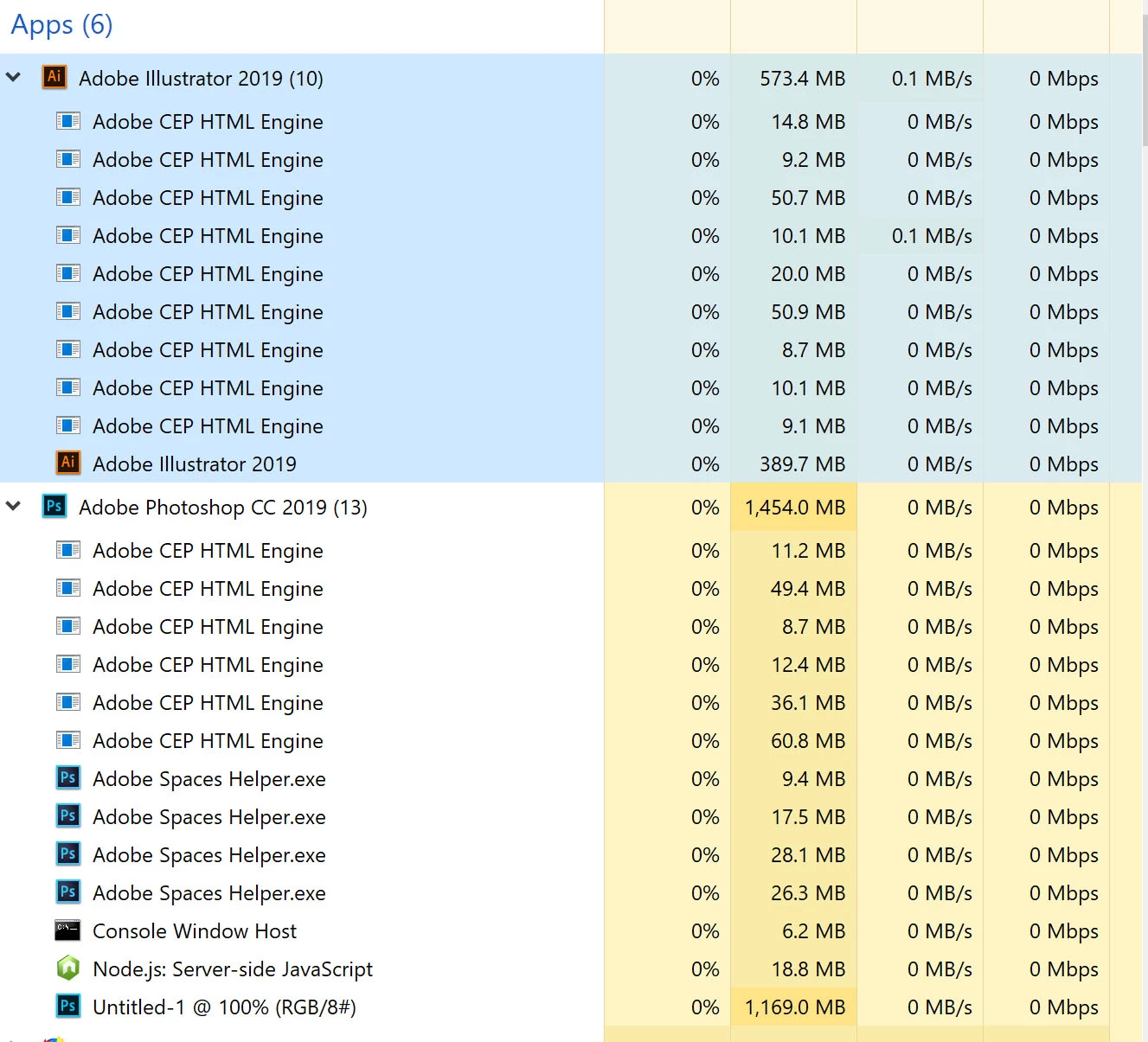
Why so many processes of Adobe CEP HTML Engine running in background on Windows system.

  • July 26, 2019
  • 4 replies
  • 24240 views

I'm using Illustrator and Photoshop CC 2019 and my task manager showed that more than 20 process of Adobe CEP HTML Engine running in the background. This is too much, how do I disable them?

I have searched the forum and the solutions found on this page does not work - High CPU usage due to CEPHtmlEngine - it's outdated and I cannot find those mentioned files in my Adobe Illustrator CC 2019 folder.

{Renamed by MOD}

    Correct answer zdvdla

    Well...I fixed it over here. But prob not the way anyone would recommend. - 

    I don't even recommend it, but my client will be happy I finished my work on time.

    SO quickly- 

    with 1 Illustrator 2023 file open

    I had 11 instances of Adobe CEP HTML Engine running

    7 instances of Microsoft Edge WebView2 running

    AIRobin 2023 (they are robbin' alright)

    1 com.adobe.AdobeSplashKit>GraphicWindowClass running

    And working on the one (1) illustrator file, nothing else open(not even MS Edge but their WebView2 was running)

    and I would move and element, save, and it would freeze- saying in taskMGR (not responding)
    I would restart Illistrator, it would not remember my save, and would show the most recent file as being one from 3 weeks ago. This happened over and over. i researched and found this page

    https://helpx.adobe.com/x-productkb/global/high_cpu_usage_cephtmlengine.html

    and decided to try the risky steps below. I saw that these files were only there to do a single function (on my computer, not sure about yours- look them up)
    so,

    I copied the names down of the files in question.
    I used task manager to find the files location

    I renamed all of the .exe files (making notes in case I had to undo this)

    I did the same for that rediculous msedgewebview2.exe and the AIRobin' (you blind) 2023
    I am really behind on my delivery today, but thought I would offer you a hail Mary if you are jammed.
    Do NOT hold Adobe responsible for this insane workaround. And don't blame me either, I am just a dude trying to help you keep your precious employment...
    Sincerely...research first, CYA, and hopfully you can get the job out and fix the dents later....

    4 replies

    Known Participant
    December 1, 2021

    Well, I have over 100 instances of the CEP HTML Engine running! I created the missing log folder. No difference.

    Known Participant
    December 2, 2021

    shawn_starc
    Inspiring
    August 2, 2019

    You can follow the below link to resolve the issue regarding the CEP HTML engine of Adobe

    High CPU usage due to CEPHtmlEngine

    Known Participant
    May 5, 2020

    This did not resolve the issues for me. Thanks for nothing Adobug.

    meowozAuthor
    Participant
    July 31, 2019

    Yes, you are right, Srishti. After I update my Windows 10, the number of CEP HTML processes reduced from 9 to 3.

    Srishti Bali
    Community Manager
    Community Manager
    August 2, 2019

    Thank you so much for confirming. Do let us know if you have any other queries. We're happy to assist.

    Participating Frequently
    April 27, 2021

    I have a Citrix server with 10 users, only one is using InDesign.

    Why has everybody started ?

    • AdobeLPCBroker.exe
    • CCXProcess.exe


    Why has the 1 Indesign user started this mutch?


    Srishti Bali
    Community Manager
    Community Manager
    July 26, 2019

    Hi there,

    Thanks for reaching and sharing the feedback. I see that there are so many CEP HTML processes running in the background. Are you facing any performance issue with Illustrator and Photoshop? If yes, let us help you make this right. I would need a few more details like:

    • Please check if there are any Windows updates pending?
    • If not, try logging in to Hidden Admin account and check how it works there?

    Regards,

    Srishti

    ARTstalgic
    Participating Frequently
    October 21, 2021

    This has actually worsened the problem. We've nearly exhausted very copy/paste Knowledge Base article provided by ADobe in both forums, calls, emails, etc...and the constant maintenance with this unreliable software is proving a trend in tail chasing reliable and effective solutions. We've even tried to uncheck the plugins that connect to the internet under "Preferences", and discovered that the uncheck does absolutely nothing as it will STILL continue regardless and sometimes runs twice the Adobe CEP html Engines. Should we get it to disable, we alos noticed when attempting any local "Saves" it seems to cue it back it up, attempts to sync to libraries and cloud, we are prompted to pay, stalls at 99%, then crashes. Our usual routine is the 3rd Save, or force Close the App, rely on Auto-Recovery, re-save under new name, copy over to project folder, then rename to actual intended filename. This routine has reduced our productivity alone by 15%. However, I do appreciate that someone reporting to the Executive branch confirmed that Adobe CC, despite it widely advertised, is not meant to run on an Enteprise server. It is my hope that Adobe will return to the Enterprise performance it had with 2017 in the very near future.